
[AF] Application control Policies does not take effect when direct pass is enabled
Problem Description
AF configured an application control Policies to prohibit Noncritical users on the intranet from accessing the Internet and only allow the server IP segment to access the Internet. It was found that Noncritical users on the network Network Segment could still open web pages.
Process——
- Check the application control Policies to see if it restricts Noncritical users.

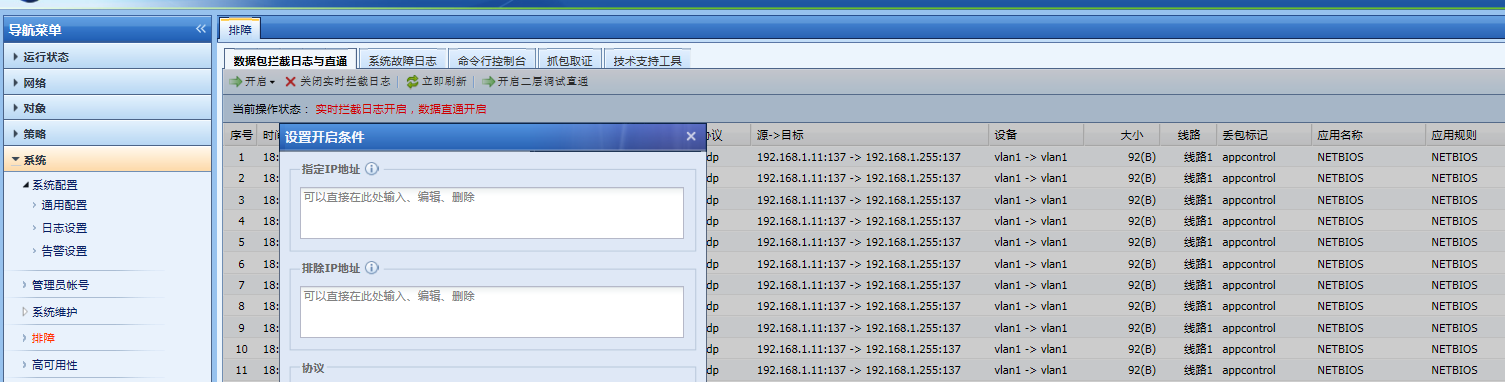
345375b66d1d2d3a89.png (74.52 KB) - Check [System] – [Troubleshooting] – [Packet Interception Log and Direct Access]. The current status shows: Real-time interception Logs is enabled, data direct access is enabled
535125b66d211b1b64.png (123.77 KB) - In order to debug Policies, direct pass was enabled before and has not been turned off since then. Click [Close real-time interception Logs] to close the direct access. Then test the application control Policies to make it effective.
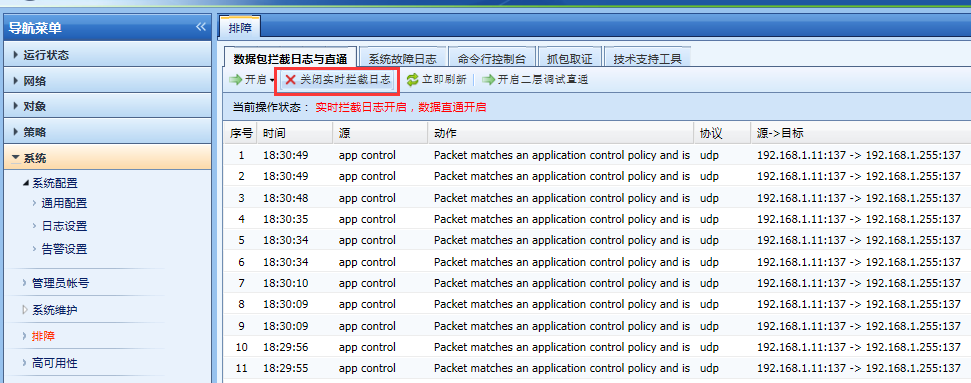
312055b66d48cb0ee1.png (93.98 KB) - [Packet Interception Log and Passthrough] is used to debug equipment and troubleshoot Network failures. After data pass-through is enabled, relevant control Policies and security protection Policies will not be intercepted, and corresponding policy logs will be recorded, without any control over the Internet access of intranet users.
Root cause
[Packet Interception Log and Direct Pass] is enabled to allow intranet data to access the Internet. When direct pass is enabled, related control Policies and security protection policies will not be intercepted, and corresponding Policies Policies will be recorded, without any control over intranet users' Internet access.
solution
After the direct connection is disabled, the application control Policies takes effect
Original Link
https://support.sangfor.com.cn/cases/list?product_id=13&type=1&category_id=250&isOpen=true