
[AF] Application control restriction on external network access to internal network Services does not take effect
Problem Description
AF gateway mode deployment, external network IP 10.1.29.3, internal network server 10.1.130.100, configure port mapping to map the public network 4430 to the server 3389, only allow the external network specified address to access the server, configure application control and find that it is not effective, non-restricted IP can still access
Warning Info
N/A
Process——
- Check the Interfaces IP
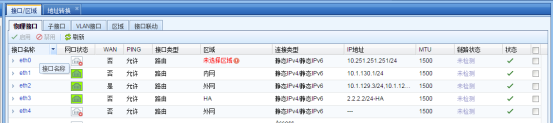
272385b2863fad63ab.png (34.41 KB) - Check Destination NAT

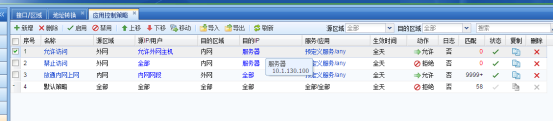
640185b286411b3c42.png (26.97 KB) - Detection application control Policies
Application control Policies is matched from top to bottom
The "Allow Access" Policies is placed above to allow access from specified external IP addresses
Move Access Denied" Policies to the "Allow Access" Policies to prevent other external IP addresses from accessing
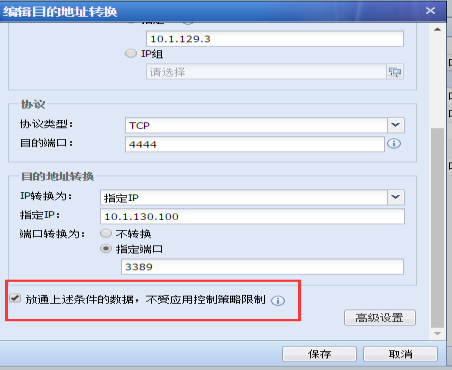
520025b28646ceb719.png (36.56 KB) - Carefully check the destination address mapping policy of "Server" and find that "Release the data under the above conditions and not subject to the application control Policies restrictions" is checked. After unchecking this option, the application control Policies restrictions take effect.
380305b2864911dd7e.png (33.43 KB)
Root cause
Policies check the option "Allow data under the above conditions to pass, not subject to application control Policies restrictions" for the Destination NAT policy, the application control policy will be automatically released, and the order will give priority to the manually configured application control Policies, making the manually configured application control Policies ineffective

540905b2865557bd27.png (17.4 KB)
solution
- Uncheck the corresponding Destination NAT Policies option "Release the data under the above conditions and not be restricted by the application control Policies"
Suggestions and Conclusion
- Check [Policies] – [Black and Whitelist] – [Release List], do not globally release the corresponding IP (source IP of user access, external network Interfaces IP, server intranet IP)
- Check [System] – [Troubleshooting] – [Packet Interception Log and Direct Connection]. Do not make the corresponding (user access source IP, external network Interfaces IP, server intranet IP) direct connection. After the direct connection is Policies, the corresponding IP policy will not take effect.
Original Link
https://support.sangfor.com.cn/cases/list?product_id=13&type=1&category_id=33&isOpen=true