
[AF] Bandwidth Management exclusion Policies does not take effect
Problem Description
The traffic control policy is configured Policies restrict intranet users from accessing the Internet. At the same time, the traffic control excludes the server IP. It is found that the traffic of server 10.1.129.8 is still restricted.
Process——
- Check the [Bandwidth Channel] Policies to limit the intranet user traffic bandwidth to 2M

737065b5b2c78785ae.png (47.22 KB)
Check whether the [virtual line] configuration is normal
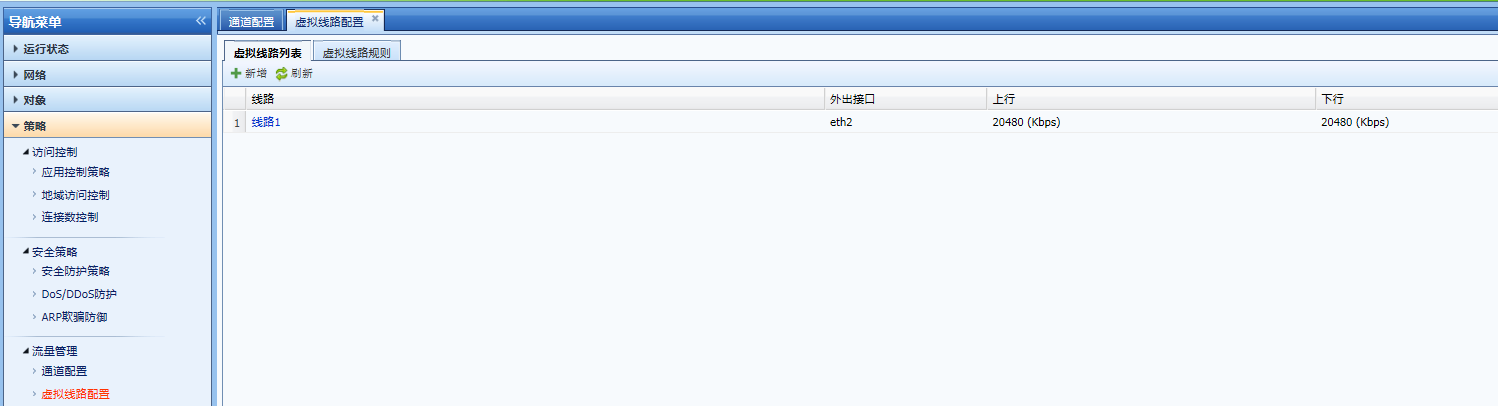
142225b5b2c884c2ec.png (48.85 KB)
Check [Bandwidth Channel] – [Exclusion Policies]

755925b5b2cb07cd4a.png (26.62 KB)
Network Objects [OA] configuration IP 10.1.129.8

14275b5b2ce4e1da5.png (42.27 KB)
- The IP setting Policies Bandwidth Management [Exclusion Strategy] is wrong. What is excluded here is the [Target Network Objects], which is the target IP accessed by the intranet source IP, not the intranet source IP. It is used to exclude the server from the intranet accessing the external network.
- Adjust the flow control Policies
Create a separate Bandwidth Management Policies for the server to limit the maximum flow and prevent Services server from occupying all the bandwidth. If you test the server traffic again, it will not be limited to 2M.
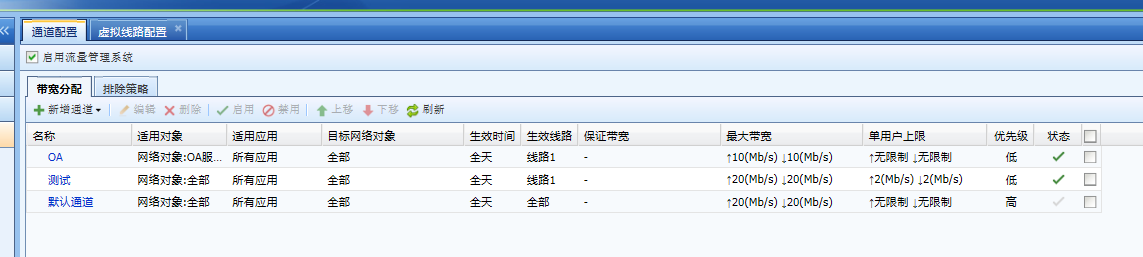
395005b5b2c61addb0.png (55.12 KB)
Root cause
Bandwidth Management [Exclusion Policies] excludes [Target Network Objects], which is the target IP accessed by the intranet source IP, not the intranet source IP. It is used to exclude the server from the intranet accessing the external network.
solution
Create a separate Bandwidth Management policy for the server and put Policies in the Bandwidth Management Policies. The Bandwidth Management policy is matched from top to bottom, and the Policies of the OA server will be matched firstPolicies
Original Link
https://support.sangfor.com.cn/cases/list?product_id=13&type=1&category_id=202&isOpen=true