
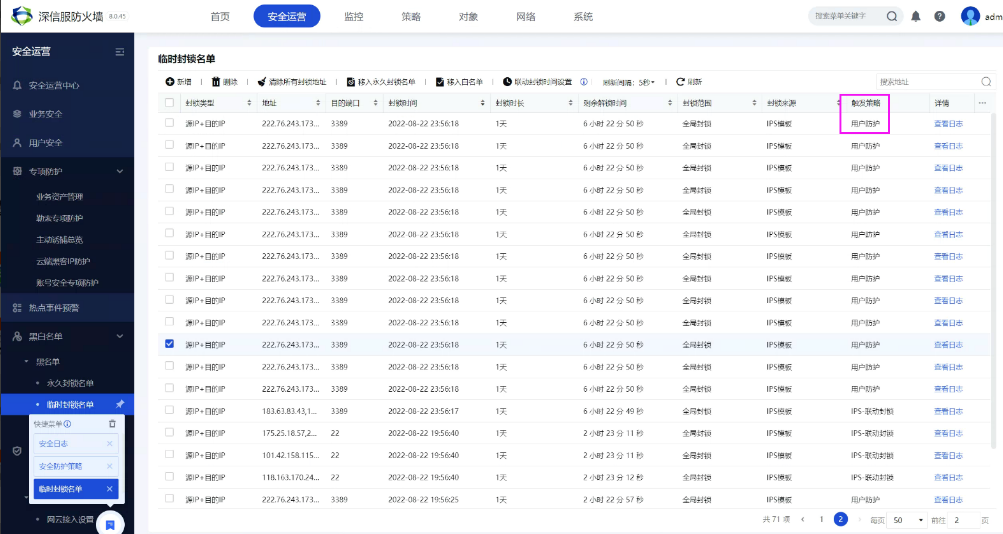
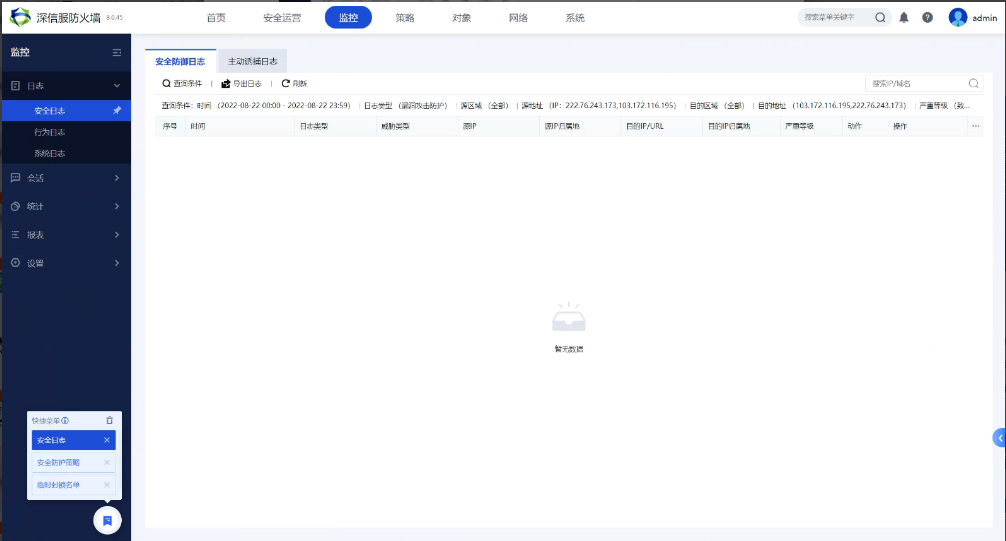
[AF] Brute force cracking triggers IP Blocking. Click query log is empty.
Problem Description
In AF8.0.45 version, in the Block IP, it is found that the source IP is blocked due to Brute-force attack protection, but when the query Logs button is clicked, the Logs is empty.
Effective troubleshooting steps
- The Monitor log is queried directly in the monitoring module. The System fault Logs does not report an error in the access System module.
- Confirm that the corresponding Policies has checked the button for recording Logs
- Export all logs of the IPS module on the day and filter the corresponding source and destination IPs. Only log records with the same source IP will be saved, but no corresponding destination IP will be found.

Root cause
After verification with R&D, we found that there was a design issue with the slow brute force module in versions prior to AF8.0.48. When the same source IP was detected brute force against multiple destination IPs within the same time range, only one security log would be recorded.
solution
This can be explained to the customer as a mechanism problem, and AF will merge by default.
If you need to record every brute force Logs, you can upgrade to AF8.0.48 version
Original Link
https://support.sangfor.com.cn/cases/list?product_id=13&type=1&category_id=1842&isOpen=true