
[AF] Client upgrade inspection error: “shell execute failed”
Problem Description
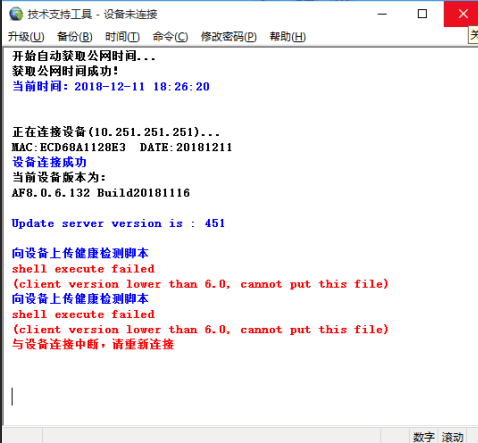
AF8.0.6 failed to perform inspection using the upgraded client.
Warning Info
The upgrade client inspection reports an error message "shell execute failed".
322765c1272f82fc9a.png (56.21 KB)
Root cause
Starting from AF standard version 7.4, inspection can only be done through web inspection, and cannot be done by upgrading the client.
solution
Starting from AF standard version 7.4, inspection can only be done through web page inspection. And web page inspection only supports AF version 6.7 and above.
Web page inspection method: After logging in to the gateway console with a browser, visit https://AF\_IP/health\_check.php, where AF_IP is the management IP Address of AF (if a port other than 443 is used, it is necessary to use AF_IP: related port).
Suggestions and Conclusion
Starting from AF standard version 7.4, inspection can only be done through web inspection, and cannot be done by upgrading the client.
Original Link
https://support.sangfor.com.cn/cases/list?product_id=13&type=1&category_id=565&isOpen=true