
[AF] Data is not accessible. Accessing SANGFORVPN via dial-in SSL VPN is unsuccessful.
Problem Description
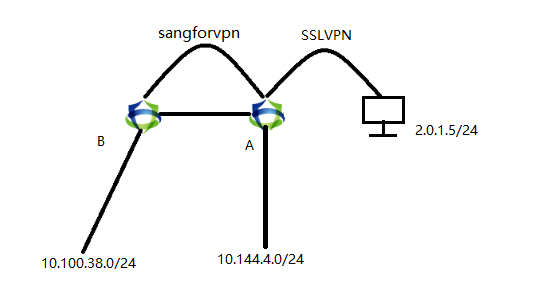
Customer demand: Services server could be accessed directly through SSL under AF. The server was migrated and was previously in Network Segment A. Now it has been migrated to the device at the other end of sangforvpn and has become Network Segment B. Although the server has been migrated, the customer does not want to change the IP address of the Services server, so an NAT is made so that the traffic passes through the Local first to match NAT and then to match the sangforvpn Layer 3 forwarding.
Traffic flow:
The source is 2.0.1.5 and the destination is 10.144.0.241. The traffic first comes from SSL VPN. After matching the Destination NAT on the A firewall, the destination is converted to 10.100.38.145. This Network Segment is published to sangforvpn by the B Local. AF forwards this traffic to the B firewall through sangforvpn, and the server returns the packet in the opposite direction.
Effective troubleshooting steps
- After dialing in through SSL VPN, the ping test on the peer server cannot be pinged, and Local is still connected.
- Packet capture confirmed that the reason was that the return packet was not converted to the address before access after the traffic passed through the Local address NAT, and the icmp id was not changed. If the icmp id has changed, please refer to https://support.sangfor.com.cn/cases/read?product_id=13&category_id=1907


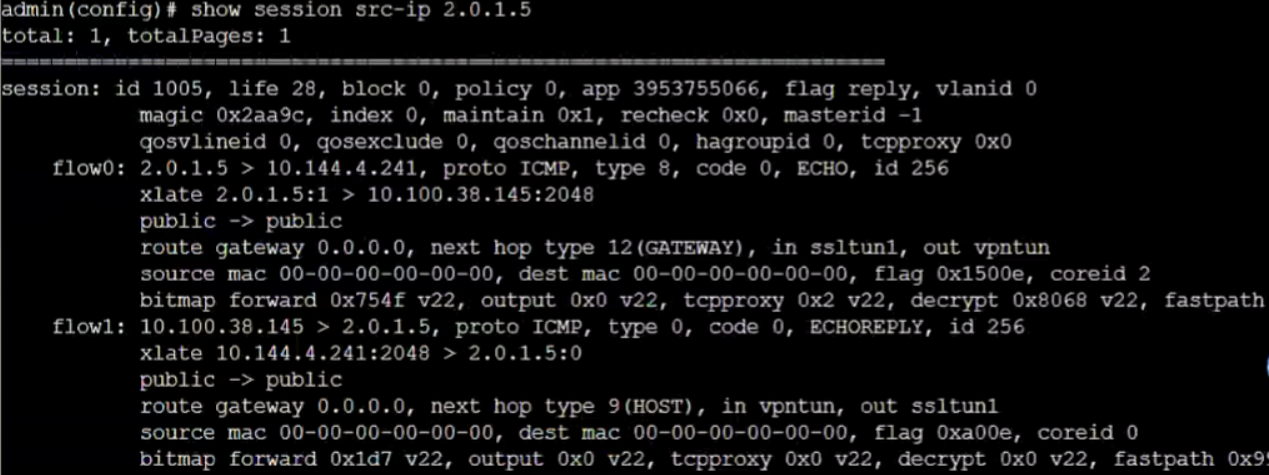
- Check Sessions in the background and confirm that the Sessions table is normal, but the return packet traffic does not match
Root cause
As of AF8.0.75, this scenario is not supported. The message returned from sangforvpn is encrypted. The hook of SSL VPN is before sangforvpn, which causes the return packet to not be returned to sslvpn.
solution
Solution 1: Make a proxy on the intranet PC in this section, come in from SSL VPN, go to the intranet PC, then go back to AF, and then go out to sangforvpn
Solution 2: Coordinate with customers to change the IP address used to access the server
Original Link
https://support.sangfor.com.cn/cases/list?product_id=13&type=1&category_id=2427&isOpen=true