
[AF] Destination NAT is not effective and the number of connections is full due to long connections
Problem Description
AF is used as an egress gateway and performs Destination NAT. The mapped server is sometimes inaccessible. It becomes normal after Restart. This happens again every few days.
Process——
- Check that AF's Interfaces IP, Destination NAT, and Layer 3 are all configured.
- After opening direct access, it is still the same
- Check Sessions Monitor and find that Sessions is displayed as a straight line
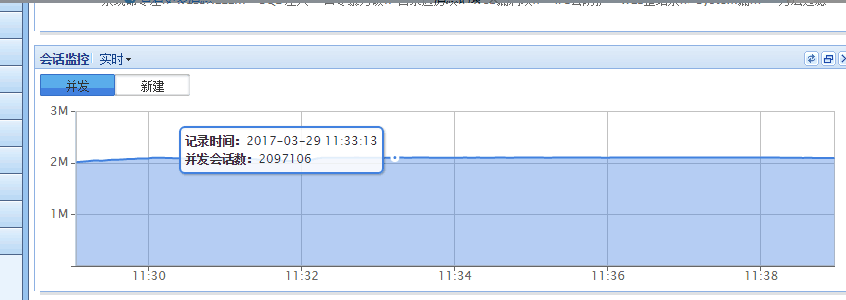
611535b38e7c236ae8.png (20.14 KB)
Indicates that the device Sessions almost fully occupied - Check the application control Policies. The default Internet access policy has [Long Connection] checked.

361755b38e809659a7.png (78.27 KB) - After communicating with the user, it was found that the user did not actually understand the function of the persistent connection. After canceling the persistent connection and Restart AF, Network returned to normal.
PS:
The long connection Policies for all AF application control policies. It is only used to support access to special servers with long connection requests, so that the connection request is not affected by Local connection timeout. Enabling this function will slow down the connection release, which may cause the number of connections to gradually increase to the upper limit of the AF connection number, causing the problem of being unable to access the Internet.
Root cause
The application control Policies set to long connection, the number of connections is released too slowly, and Sessions is full, resulting in the failure of Destination NAT.
solution
Cancel the persistent connection, Restart AF to release Sessions, and Network will return to normal after restart.
Original Link
https://support.sangfor.com.cn/cases/list?product_id=13&type=1&category_id=75&isOpen=true