
[AF] Direct Interfaces AF cannot ping the interface IP, security awareness linkage IP Blocking
Problem Description
The computer is directly connected to AF, and can log in to AF through the console, but the computer cannot ping the AF Interfaces IP. The AF interface allows Interfaces.
Process——
- [System] – [Troubleshooting] – [Packet Interception Log and Direct Connection] – [Enable Real-time Interception Log and Direct Connection], enable direct connection for the test computer IP, the computer can ping AF's IP normally, and the packet loss mark shows "aifw", which is the linkage block of [Block Attacker IP]
- [Running Status] – [Block Attacker IP] Check IP Lockout and find that the corresponding IP is blocked. The triggering Policies is [Security Awareness Platform Configuration]

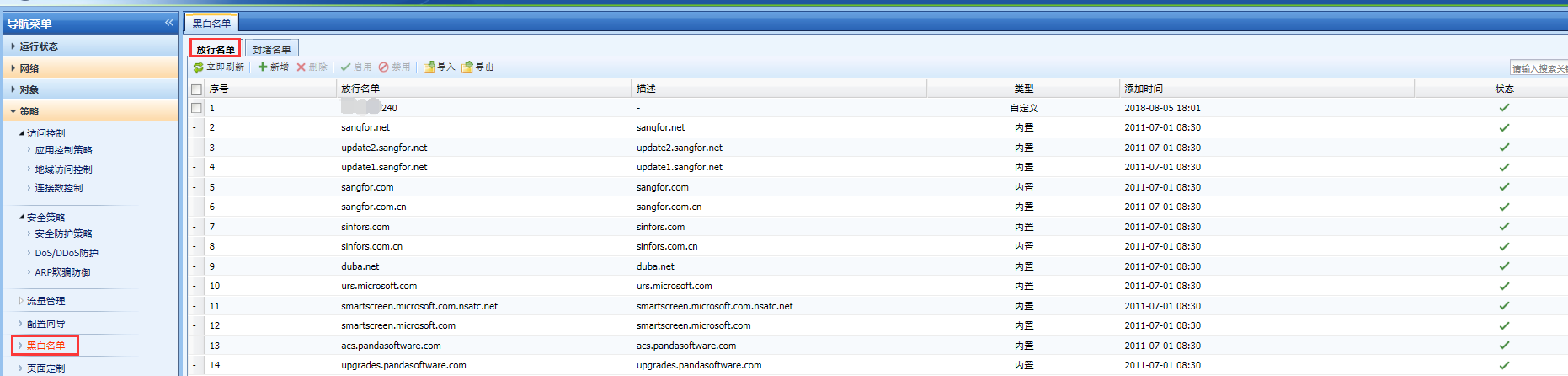
628435b66c621ab47b.png (84.56 KB) - AF is linked with the security perception platform. Add the corresponding IP Lockout to the [release list], close the direct connection, and directly connect the computer to PING the AF Interfaces IP and it will be normal. This article does not explain Policies configuration issues of the security awareness platform. The security awareness platform adjusts its policies on its own.
134885b66cb3693de0.png (105.44 KB)
Root cause
The security perception platform makes a linkage strategy and sends it to AF to [block the attacker's IP], and AF cooperates to intercept
solution
Add the corresponding IP to AF's [release list], and adjust the security perception platform configuration issues by yourself. This article will not explain it.
Original Link
https://support.sangfor.com.cn/cases/list?product_id=13&type=1&category_id=249&isOpen=true