
[AF] Email alert configuration uses 365 mailbox to report an error prompting identity authentication failure
Problem Description
When configuring email alerts for AF devices, an error message appears indicating that authentication failed when using 365 mailboxes, but it works fine when using other mailboxes
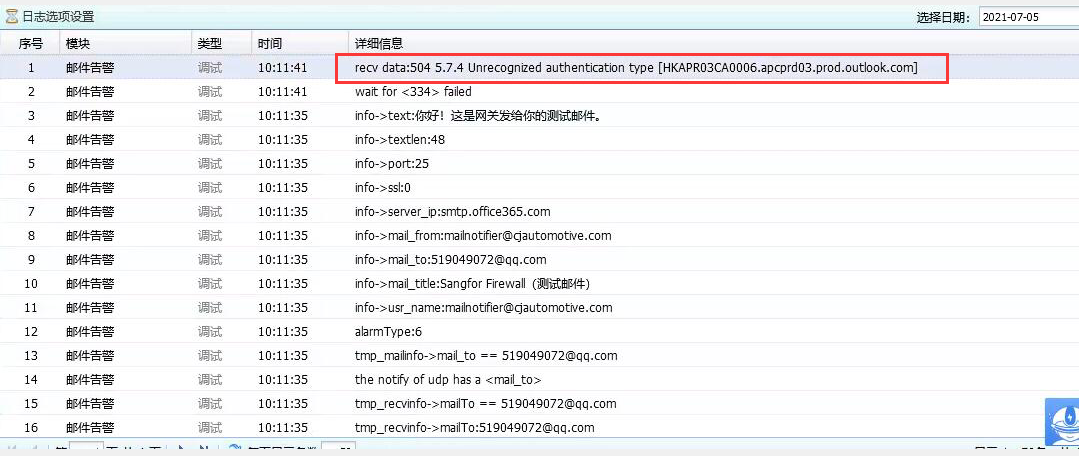
Warning Info
Effective troubleshooting steps
- Check System fault log and the error is 504 5.7.4 Unrecognized authentication type
- Verify that the password is correct and that you can log in and send logs normally through the Foxmail clientLogs
- Capture the AF Interfaces data packet and analyze it to see if the server returns 504 Authentication failure
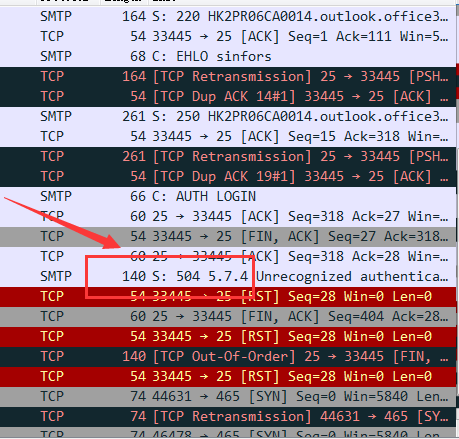
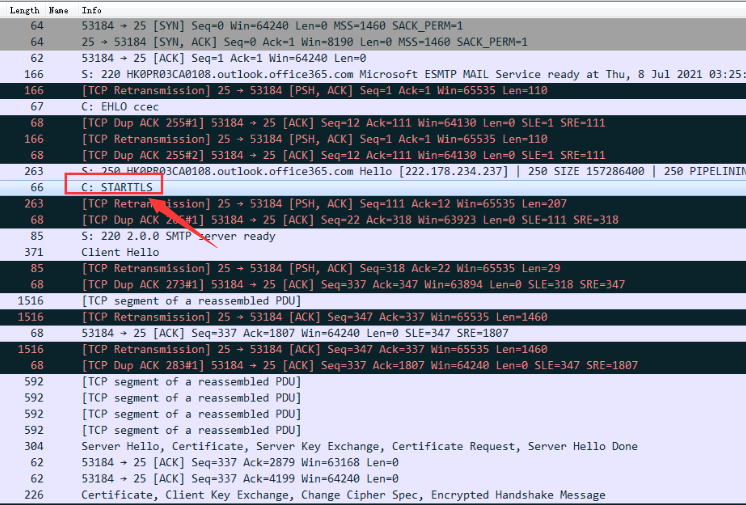
- Log in to the computer Foxmail client with an account to capture the normal email data packets. Compare the captured packets and analyze them. The conclusion is: after the plaintext handshake, the server replies to start SSL encryption. AF's email alerts are either a single plaintext connection or a single encrypted connection. 365 mailbox sends emails in a mixed mode of plaintext interaction first and then starts TLS handshake encryption Sessions. As of the standard version AF8.0.35, it is not supported yet.
Root cause
365 mailbox sends emails in a mixed mode of plain text interaction first and then starts TLS handshake encryption Sessions. As of the standard version AF8.0.35, it does not support this.
solution
It is recommended to change the mailbox
Original Link
https://support.sangfor.com.cn/cases/list?product_id=13&type=1&category_id=1220&isOpen=true