
[AF] Enabled arbitrary behavior IP Blocking, Network not linked
Problem Description
AF8.0.17, configured user security Policies, configured botnet and arbitrary behavior IP Blocking, found botnet Logs, but no linkage.
Effective troubleshooting steps
-
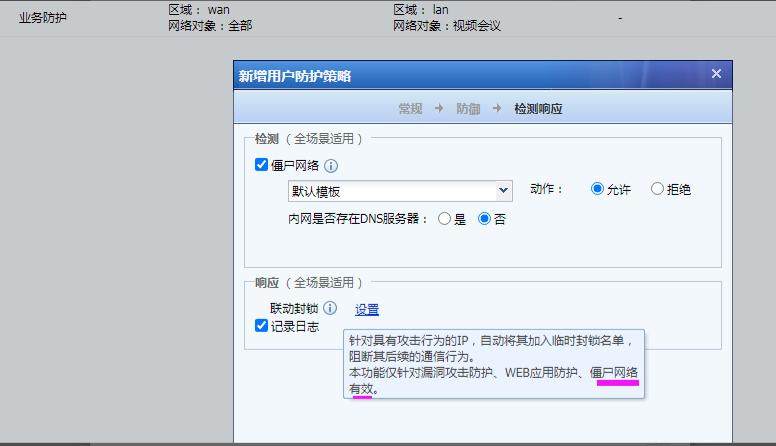
Check the description of Policies and IP Blocking, and it is shown that it contains Network;
-
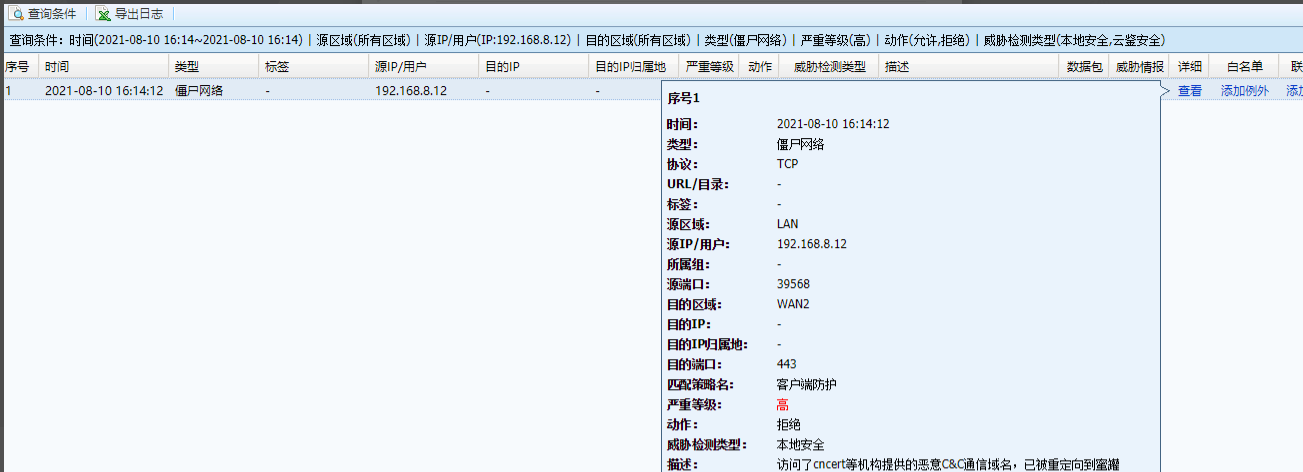
Check the Network Logs to see if there is a connection to the C&C malicious domain name.
-
Confirm the effect of botnet IP Blocking: For the botnet function, High IP Blocking is invalid. Any IP Blocking is only effective for two functions, namely botnet black IP and Trojan.
The corresponding Logs is C&C domain name communication, which will not be blocked in IP Blocking.
Root cause
For the botnet function, turning on High IP Blocking is invalid, and turning on arbitrary IP Blocking is only effective for two functions, namely botnet black IP and Trojan.
solution
It is normal that the corresponding log is not IP Blocking block
Original Link
https://support.sangfor.com.cn/cases/list?product_id=13&type=1&category_id=1250&isOpen=true