
[AF] Floating Layer 3 causes the active/standby switchover time to be too long
Problem Description
It takes about 8 seconds for the primary to Network to recover, and only 1 second for the backup to switch back to the primary.
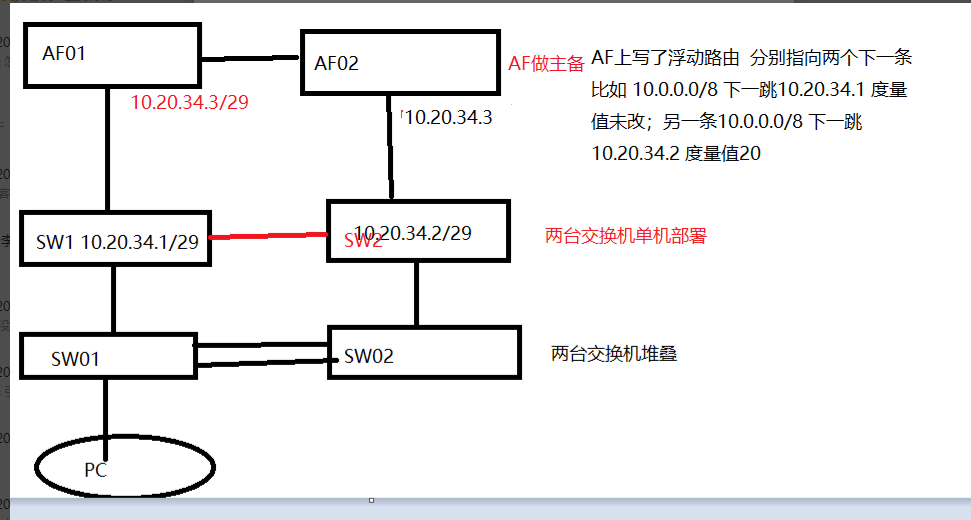
Network topology:
Warning Info
N/A
Effective troubleshooting steps
Capture the packet to check that it takes about 6 seconds to initiate the ARP detection sw2 when the active/standby switch is in progress.
Root cause
Since the floating Layer 3 has a higher Priority, its next hop is x.x.x.1 of sw1, and the next hop of the Layer 3 Priority a lower priority is x.x.x.2 of sw2. When the active-standby switch is in effect, the standby machine cannot access the ip of sw1. The Priority will fail to detect the Layer 3 on the standby side (it takes 6 seconds to detect). Only after the standby machine can access sw2, the Layer 3 with a lower Priority will take effect, and the service will be available.
solution
The master and backup machines are equipped with different real IPs for link detection, and virtual IPs are configured to run business traffic. The virtual IP is configured to the interface IP configured in the mirror mode before modification. If the mirror mode is not enabled, the Interfaces IP configuration will not be synchronized.
Operation Impact Scope
Modify the Interfaces IP to a virtual IP
Is this a temporary solution?
Non-VPN
Suggestions and Conclusion
When the host is configured with a virtual IP, it is recommended that the standby machine first clear the real IP on the corresponding physical port, otherwise it may cause synchronization abnormalities.
Original Link
https://support.sangfor.com.cn/cases/list?product_id=13&type=1&category_id=1809&isOpen=true