
[AF] Hot events cannot be submitted after clicking on immediate protection
Problem Description
A customer reported that after clicking Immediate Protection in the AF hot event handling, more than 20 security policy prompt Zones were automatically generated. After clicking on "Immediate Protection" for a hot event, the protection policy cannot be submitted and issued.
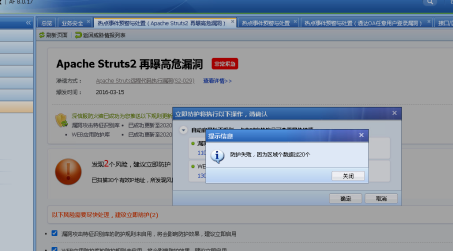
Effective troubleshooting steps
1. Check the user configuration and find that there are more than 20 regions, most of which are default Zones. But it cannot be deleted, the delete button in the display Zones is gray.
2. Check and find that the customer has connected to the Platform-X. After releasing Platform-X, Zones can be deleted. After deleting irrelevant Zones, there Zones less than 20 remaining areas, and the protection configuration is delivered normally.
PS: Deleting a Zones is a High operation. You need to confirm that there is no reference relationship before deleting it.
Root cause
If there are more than 20 areas in the device Zones configuration, the "Threat Intelligence and Disposal Protection Policies" cannot be issued, and because the customer has added a Platform-X, the redundant Zones configuration cannot be deleted.
solution
After dismissing the Platform-X, you can delete Zones. After deleting irrelevant Zones, there Zones less than 20 remaining areas, and the protection configuration is delivered normally.
PS: After modification, reconnect the Platform-X
Original Link
https://support.sangfor.com.cn/cases/list?product_id=13&type=1&category_id=961&isOpen=true