
[AF] How to Local in to the standby machine through the host management address in a dual-machine deployment of a firewall
Problem Description
In the case of AF dual-machine deployment, the backup machine cannot be logged in through the intranet.
Process——
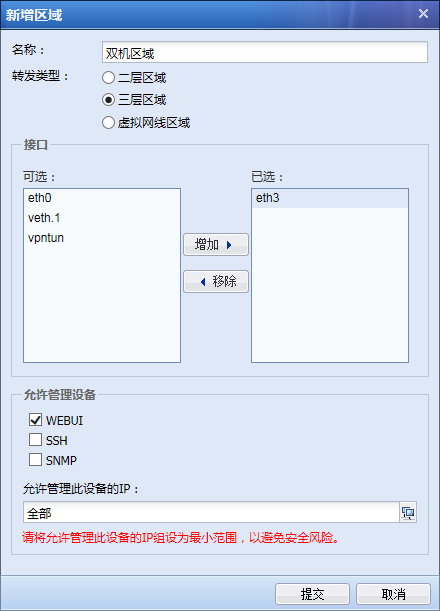
Add the Heartbeat Interface of the dual-machine to the dual-machine Zones, and check [WEBUI] in Zones dual-machine area, as follows:
256385b4f342a1a74b.png (37.59 KB)
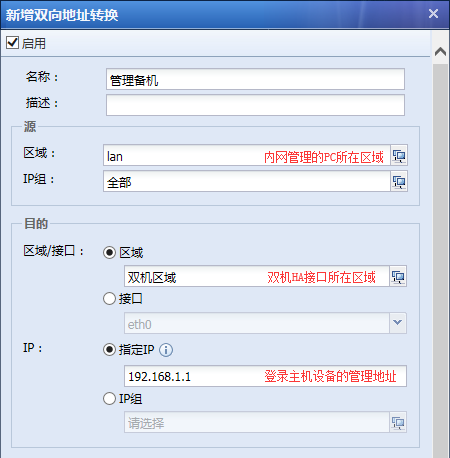
Configure Bidirectional NAT, select the area where the host management address is Zones the source area, select the area where the heartbeat interface is located Interfaces the Zones, specify the IP as the host management address IP (such as: 192.168.1.1), select a non-host device login port and a non-in-use port (such as: port 444), as follows:
196495b4f361b90f05.png (34.12 KB)
,
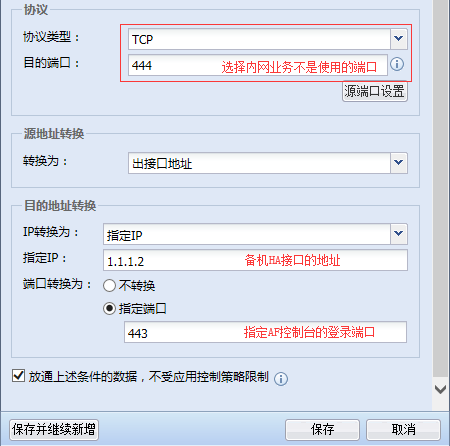
Select a non-host device login port and a non-in-use port (such as port 444), and fill in the backup machine heartbeat interface address Medium [Interfaces Destination NAT] as follows:
330205b4f368aa3b8f.png (30.6 KB)
After that, you can log in to the standby machine WEB console through HTTPS://AF host management address + ':' [destination port] (such as: HTTPS://12.168.1.1:444). However, if you do this, you cannot log in to the primary and standby machines at the same time. If you open one console, the other will automatically exit.
Root cause
The interface that the AF device standby joins in monitoring can only receive data packets but not send data packets.
solution
By configuring Bidirectional NAT, dual data is converted to the standby machine through the Heartbeat Interface to meet the need to log in to the standby machine.
Suggestions and Conclusion
Modifying the configuration may cause a dual-machine switch, so it is recommended to perform the operation after get off work.
Original Link
https://support.sangfor.com.cn/cases/list?product_id=13&type=1&category_id=135&isOpen=true