
[AF] How to modify the percentage of automatic log deletion in the Logs data center
Problem Description
The external data center takes up too much server disk space, so automatic log deletion needs to be set up.
Process——
Open the external data center client and set it to delete logs older than a specified number of days or set it to automatically delete when the remaining space threshold is reached.
This can be set in the external data center client [Tools] – [Auto Deletion Settings].
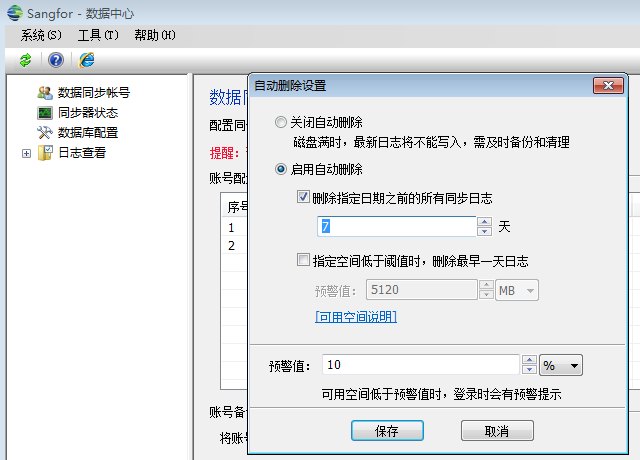
894275b553a20dcbce.png (39.68 KB)
Root cause
Automatic log deletion is not set, causing the disk space to fill up.
solution
Configure automatic deletion settings.
Suggestions and Conclusion
Configure automatic log deletion and set the specified number of days or when the log exceeds the threshold as required.
Original Link
https://support.sangfor.com.cn/cases/list?product_id=13&type=1&category_id=163&isOpen=true