
[AF] How to troubleshoot the lack of add user and delete buttons in VPN user management
Problem Description
When the administrator clicks the Local Users and Connection Management section of the IPSEC VPN, there are no Add User and Delete buttons, and VPN users cannot be added or deleted.
Warning Info
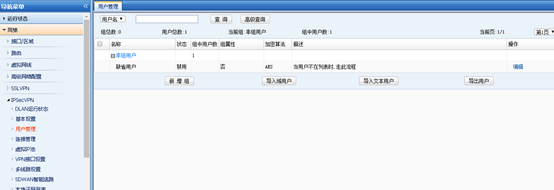
873935dc1815021752.png (33.3 KB)
Process——
Check the Central Management settings as follows:
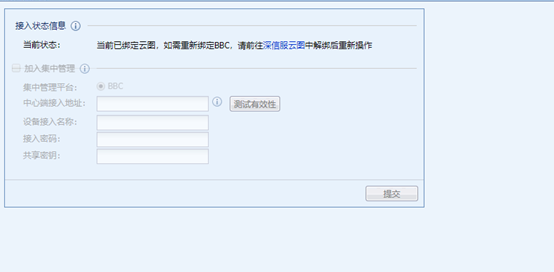
Take the standard version AF7.4 as an example: In [System] – [Central Management]
458055dc1817e67fc8.png (33.16 KB)
Check if the device has not been added to the Central Management platform. The problem is not caused by joining the Central Management platform, but the device prompts that it has been bound to the Platform-X.
Root cause
If an AF device is added to a Central Management platform or Platform-X, the Local Users and VPN Connection configuration interfaces at the VPN will not display the add user and delete buttons.
solution
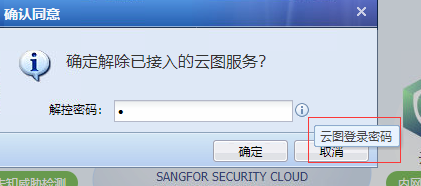
- In the next generation security protection system, click on the Platform-X and unbind Platform-X as follows:
Take the standard version AF7.4 as an example: In [Next Generation Security Protection System] – [System Overview] – [Platform-X]
656275dc181890c754.png (36.43 KB)
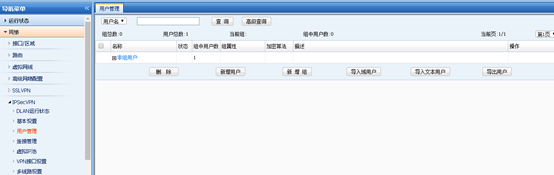
The unlock password here is not the password for joining the Platform-X. The customer needs to find the corresponding Services manager to obtain this unlock password. - After unbinding the Platform-X, the Local Users and VPN Connection management at the VPN are displayed normally, as follows:
784915dc181a4eb7c8.png (29.91 KB)
Original Link
https://support.sangfor.com.cn/cases/list?product_id=13&type=1&category_id=752&isOpen=true