
[AF] Interfaces identification anomaly causes the selected Interfaces the aggregate Interfaces to fail to display
Problem Description
The aggregate Interfaces cannot display the selected Interfaces
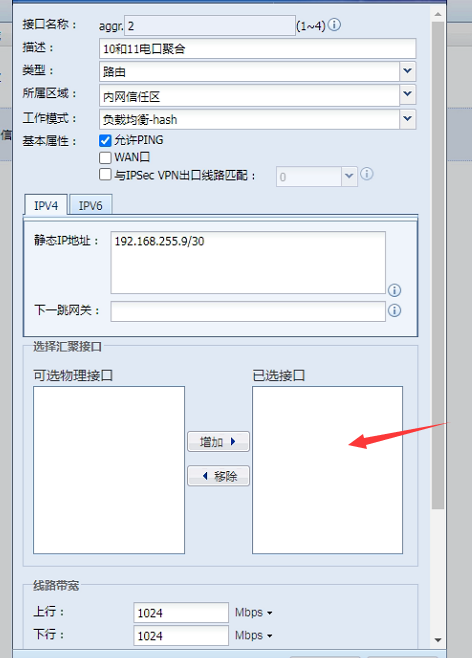
Warning Info
Changing the browser still displays abnormally. Using F12 to check the server error, I found that there was an Interfaces Info error.
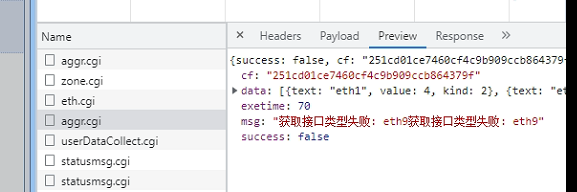
Effective troubleshooting steps
The backend checks the 9-port network port Info abnormally

Check the messages log and find that there is a log of unsupported modules that cannot be recognized. Confirm with the customer that the nine ports have been connected to the optical module for testing. No recognition resulted in abnormal recognition of the 9-port network card.
Root cause
The optical module was previously connected, causing the network card to recognize abnormally
solution
The network port is not connected to the optical moduleRestart and wait for five minutes for Local to re-identify the network card.
If you are connecting an optical module, try to ensure that the optical module is a Sangfor optical module or an optical module from another manufacturer that the device is confirmed to be compatible with. Cut off the power, unplug the optical module and let it sit for five minutes, then re-identify the connected optical module.
Operation Impact Scope
Network card re-identification requires Restart the device and leaving it idle for five minutes. Restart affects business. Confirm with the customer the operation during the business window period.
Original Link
https://support.sangfor.com.cn/cases/list?product_id=13&type=1&category_id=1958&isOpen=true