
[AF] Intranet monitoring AF has the behavior of Scheduled Active Scan the server
Problem Description
A security device on the intranet detects the Local address Scheduled Active Scan intranet server
Process——
Check [Threat Intelligence Warning and Disposal] – [Settings] to set the server Network Segment and check "Automatically scan after new events break out"
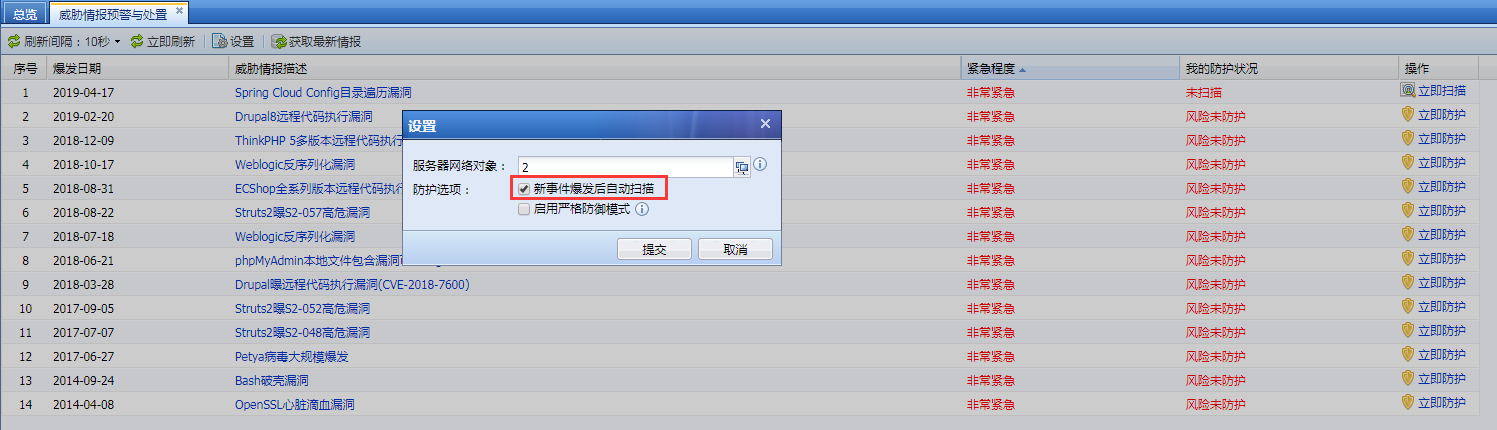
113605cd3343eb2183.png (133.44 KB)
Root cause
Threat intelligence warning and disposal functions will automatically scan and configure server Network Segment devices
solution
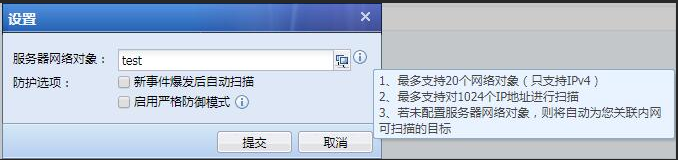
- Take the standard version AF7.3 as an example: In [Risk Discovery and Protection] – [Threat Intelligence Warning and Disposal] – [Settings], select "Server IP Group" and uncheck "Automatically scan after a new event breaks out"
- Take the standard version AF7.4 as an example: In the upper right corner of Web UI, go to [Security Assistant] – [Threat Intelligence Warning and Disposal] – [Settings], select "Server IP Group", and uncheck "Automatically scan after a new event breaks out".
532395cd33334ef9d0.png (101.17 KB)
Original Link
https://support.sangfor.com.cn/cases/list?product_id=13&type=1&category_id=694&isOpen=true