
[AF] Intranet PC mail client reports an error “The remote host forcibly closed an existing connection”
Problem Description
When using an email client on an intranet PC to interact with an external SMTP Server, an error message appears every time an email is sent or received: "The remote host forcibly closed an existing connection."

Effective troubleshooting steps
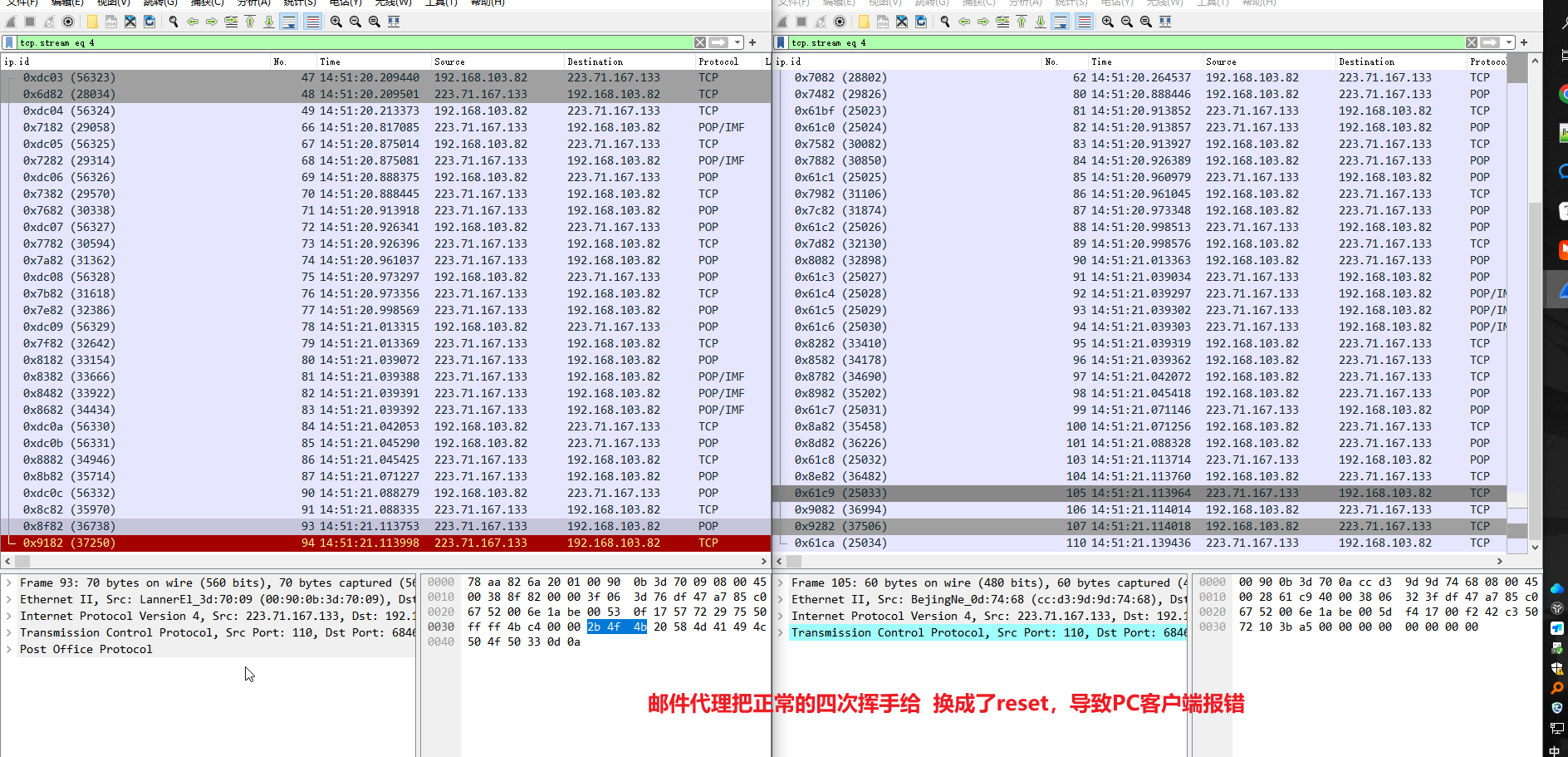
Capture packets at both the internal and external network ports of AF, filter out the relevant TCP flows, and compare and find
- The ip.id changes before and after AF forwards the data packet, indicating that it has passed through the AF mail proxy and the AF Email Protection function is effective.
- Tracking the TCP flow, it is found that the interaction data between the internal and external network ports is consistent. So it is speculated that although there is an error, the business is normal
- Carefully analyze the data packets of the internal and external network ports and find that AF has converted the four handshakes into reset
solution
The mechanism is as follows. In order to speed up the disconnection of TCP connections, AF proxy the four handshakes into a reset.
The actual interaction data has not changed. It has been confirmed that related businesses such as sending and receiving emails are normal, but there will be errors. You can explain it clearly to the customer.
Original Link
https://support.sangfor.com.cn/cases/list?product_id=13&type=1&category_id=2467&isOpen=true