
[AF] Intranet terminals randomly lose access to the Internet. Changing the IP address on the terminal will restore access to the Internet.
Problem Description
Users reported that one or more of the intranet terminals were unable to access the Internet at random, but the situation returned to normal after changing the intranet IP.
Process——
- Policies] – [NAT] that the Source NAT of the proxy Internet access is configured to be converted to the outbound Interfaces IP, as shown below:
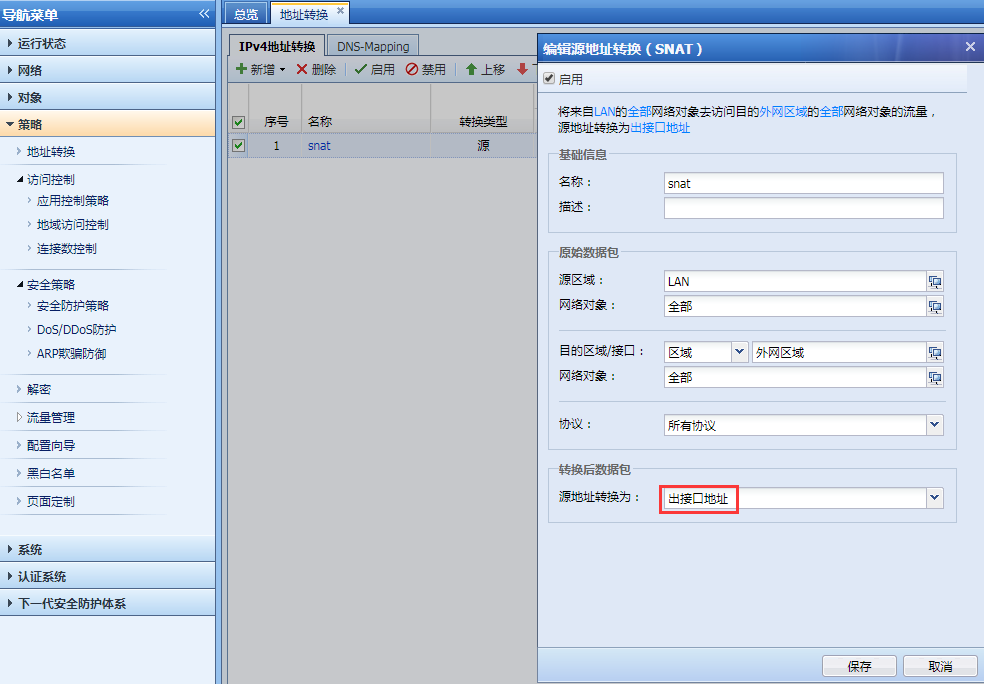
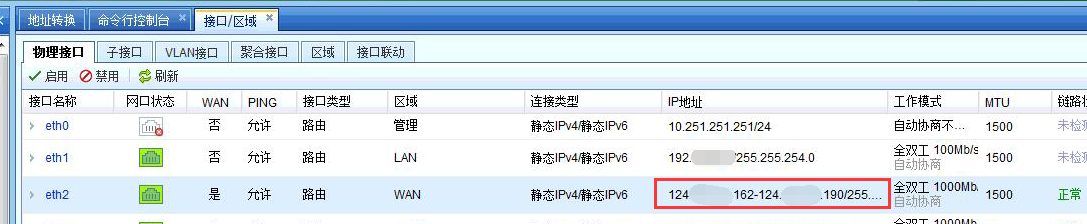
298465cb4899427548.png (95.02 KB) - [Network] – [Interfaces Zones] confirm that multiple public IPs are configured on the WAN interface, as shown below:
110135cb48a3b0f36d.png (154.05 KB) - Use the PC that cannot access the Internet and the PC that can access the Internet to ping the public network address 8.8.8.8 respectively, and capture the data packets of the device WAN attribute port in AF [System] – [Troubleshooting] – [Packet Capture and Forensics] for analysis, as shown below:
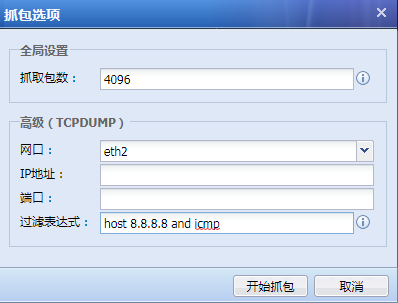
32475cb49ea012cdf.png (23.72 KB)
The abnormal PC data packet shows that the source IP is converted to 124.X.X.163, and no reply packet is received from the public network, as shown in the following figure:

824805cb48b3cb8d44.png (279.9 KB)
The source IP of a normal PC data packet is converted to 124.X.X.189, and is forwarded normally and received back from the public network, as shown in the following figure:

484555cb48c0aad825.png (373.43 KB)
Root cause
Some IPs in a large Network Segment cannot access the Internet
solution
Policies [Policy] – [NAT], configure SNAT to convert the source IP into the normal WAN Interfaces public IP.
Original Link
https://support.sangfor.com.cn/cases/list?product_id=13&type=1&category_id=677&isOpen=true