
[AF] IPS Policies actions are inconsistent with data Logs logging
Problem Description
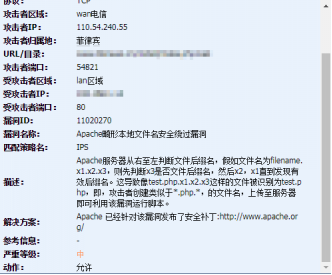
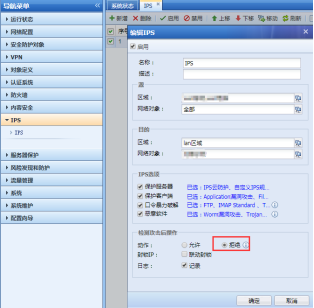
Policies IPS policy action is deny, but the Logs action is allow, as follows:
IPS Logs:
80075b5aeb77352f5.png (75.62 KB)
IPS Policies action:
679625b5aeb8564558.png (45.2 KB)
Process——
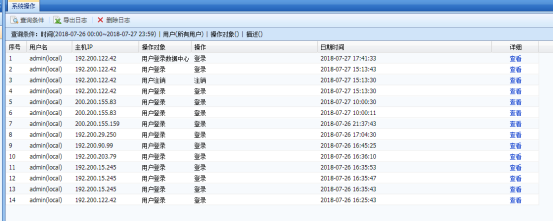
Confirm that the IPS Policies is deny, and the data center does not record the operation log modified by IPS, as follows:
791855b5aebc66cb38.png (65.67 KB)
Root cause
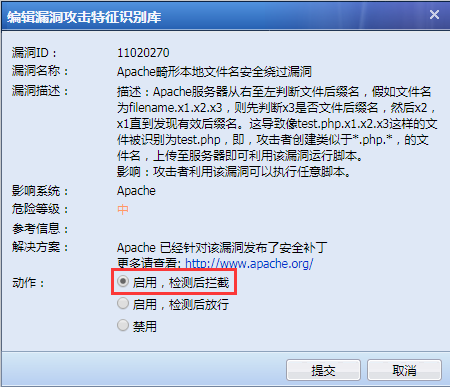
When the IPS Policies action is to deny, the rule deny action is determined by the corresponding rule id. If the rule id action is to allow the rule, the Policies action is to allow; if the rule id action is to deny, the Policies action is to deny.
solution
You can find this rule in the rule base according to the corresponding rule ID, and then modify the rule action as follows:
46715d6dc666ce7ca.png (53.03 KB)
① Take the operation path of the standard version AF7.3 as an example: You can check the total number of entries in the lower right corner Medium [Security Protection Object]-[IPS Vulnerability Feature Recognition Library]
② Take the standard version AF7.4 as an example: you can go to [Objects] – [Threat Signature Databases] –
Suggestions and Conclusion
When modifying the rule ID, you need to confirm whether it affects the intranet business. For rules like this, where the default action is to allow, the levels are medium or low. Although the harm is not great, it may cause misjudgment.
Original Link
https://support.sangfor.com.cn/cases/list?product_id=13&type=1&category_id=191&isOpen=true