
[AF] IPSEC Phase II connection failed and the interested stream does not match
Problem Description
AF8.0.35 version, standard IPSEC and Huawei equipment docking, the second stage docking cannot be achieved
Effective troubleshooting steps
-
Log printing: No corresponding sub-Policies was found. The configuration may have been deleted. Please check whether the inbound and outbound Network Segment are normal.

-
Check and configure the flow of interest to us. Only one flow of interest is configured, and two Network Segment are configured for outbound, as shown in the following figure:
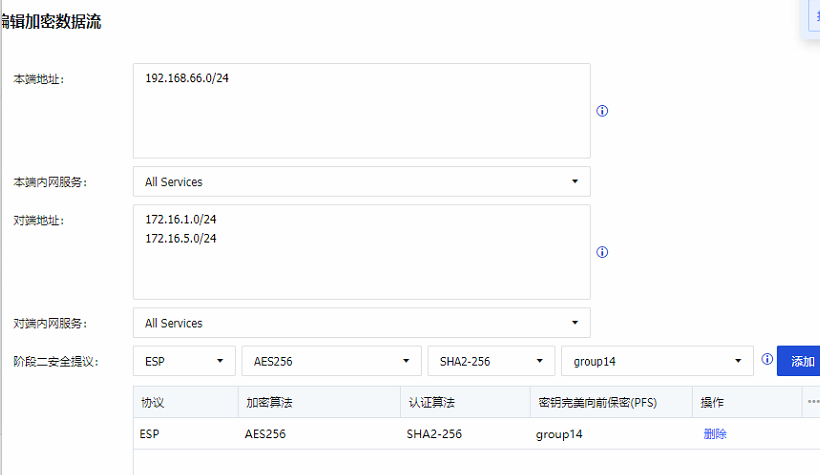
Huawei has configured ACL Policies and two Network Segment, which are consistent with our configuration in terms of content.

Root cause
If our company's standard IPSEC is connected with a third-party manufacturer, in the flow of interest, whether it is outbound or inbound, only one network segment can be configured at a time, and two Network Segment cannot be configured at a time. For example, in this case, two Network Segment are configured in the outbound (as a whole), and the other party only sends one Network Segment when negotiating. The two do not match, resulting in IPSEC abnormality (this problem exists in AF8.0.32 to AF8.0.75, SDW-R4.0.0 to 4.0.70, and needs special attention)
solution
Our company is interested in the outbound Policies the flow of interest to configure two flows of interest
Operation Impact Scope
N/A
Suggestions and Conclusion
This problem exists in AF8.0.32 to AF8.0.75, SDW-R4.0.0 to 4.0.70, and needs special attention.
Original Link
https://support.sangfor.com.cn/cases/list?product_id=13&type=1&category_id=2443&isOpen=true