
[AF] IPV6 directional direct access does not work, global direct access works
Problem Description
AF Virtual wire is deployed and inserted into Network. The Policies allows a single v6 from the intranet to the external network. However, the single v6 from the internal network cannot be connected. Packet capture shows that v6 actively initiates data packets. The internal and external network Interfaces forward data normally. There is no packet return from the public network. After global direct connection is enabled, the public network returns packets normally.
Effective troubleshooting steps
- Normally capture the v6 packet analysis without enabling direct pass-through. It is found that both the internal and external network ports forward the v6 icmp packets, but there is no reply packet from the public network.
- After enabling global direct access, packet capture and analysis revealed that icmpv6 was sending and receiving normally, and the public network was returning packets normally;
- Consult R&D and they told us that the IPV6 detection packet might be intercepted, causing the external network gateway to not reply. They suggested capturing the entire packet.
IPV6 detection package principle link: Detailed explanation of Ipv6-NS/NA negotiation package - Log in to the backend to capture all IPV6 packets, including the packets during the access failure period and the packets during the access permission period, save them locally, and use wireshark for comparison and analysis;
Packet capture command: tcpdump -i ethX vlan and ip6 -nnv -c 100 -s0 -w /tmp/xxx.pcap - Comparing the packets when the communication is successful and when the communication is unavailable, we found that the icmpv6 communication is normal only after the NS/NA negotiation of v6 is normal. However, the customer's application control policy only allows the source and destination v6 Policies to pass, but does not allow the NS/NA negotiation packets of the v6 gateway to pass:
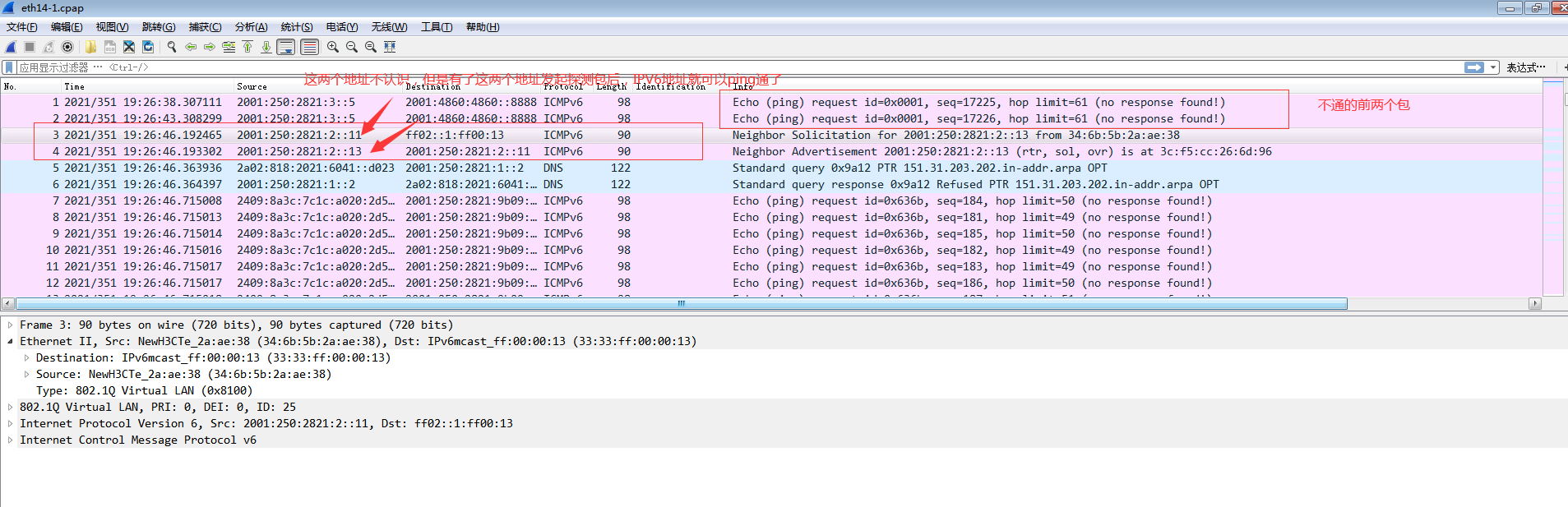
6. Log in to Local, modify the Policies the application control policy, add these two detection addresses and open them, then data access will be normal.
Root cause
There is a problem with the IPV6 mechanism. The access is not comprehensive. The IPV6 detection packet is not allowed. Only the source and destination addresses are allowed.
solution
The IPv6 detection address needs to be allowed.
Suggestions and Conclusion
To troubleshoot IPV6 access failures, we recommend that you capture all packets for detailed analysis. You should capture both accessible and unaccessible packets for detailed analysis.
Original Link
https://support.sangfor.com.cn/cases/list?product_id=13&type=1&category_id=1431&isOpen=true