
[AF] LDAP synchronization failed. The LDAP server Services organization structure was not selected.
Problem Description
[Authentication System] – [Local Users] – [LDAP User Sync] Click Synchronize Now, and it will show that the synchronization failed, as shown below:
[attach]219257[/attach]
Process——
- [Authentication System] – [User Authentication] – [External Authentication Server], test the server availability, as shown below:
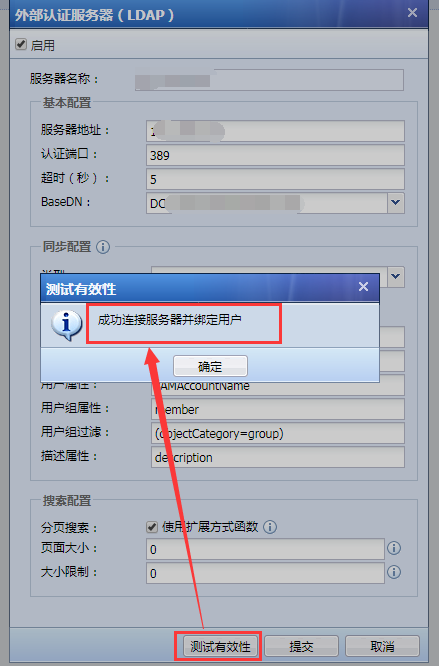
850165b7d6061827b1.png (65.17 KB) - [Authentication System] – [Local Users] – [LDAP User Sync] to check the synchronization Policies, and find that the organizational structure of the synchronization server is not selected, as shown below:
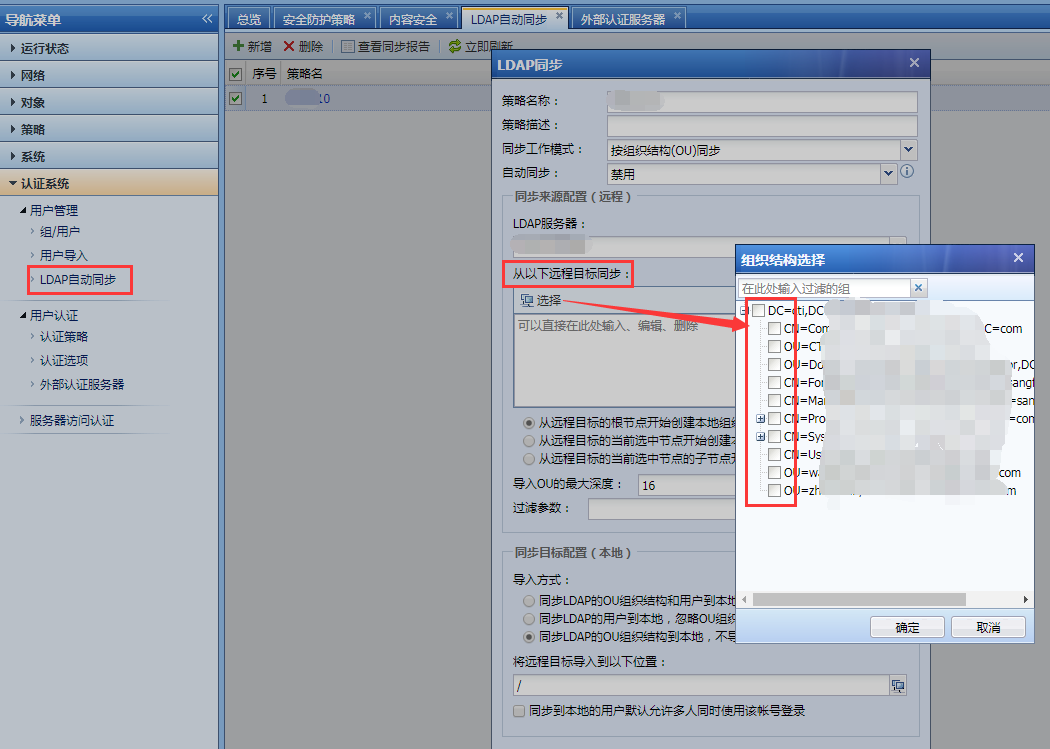
142595b7d61248dbef.png (135.3 KB) - In [Authentication System] – [Local Users] – [LDAP User Sync]Medium check the corresponding LDAP server organizational structure in the Services strategy to synchronize successfully.
Root cause
Medium Policies LDAP synchronization policy, the organizational structure of the server to be synchronized is not selected, resulting in LDAP synchronization failure.
solution
[Authentication System] – [Local Users] – [LDAP User Sync] Medium synchronization Policies, check the corresponding LDAP server organizational structure to synchronize successfully.
Original Link
https://support.sangfor.com.cn/cases/list?product_id=13&type=1&category_id=306&isOpen=true