
[AF] Open the direct log prompt “Evasion”
Problem Description
The intranet cannot access the external server individually, but it works normally when direct access is enabled. The direct access log prompts as follows.
① Take the standard version AF7.3 as an example: You can configure it in [Maintenance] – [Packet Interception Log and Direct Passthrough]
② Take the standard version AF7.4 as an example: You can configure it in [System] – [Troubleshooting] – [Packet Interception Log and Direct Access]
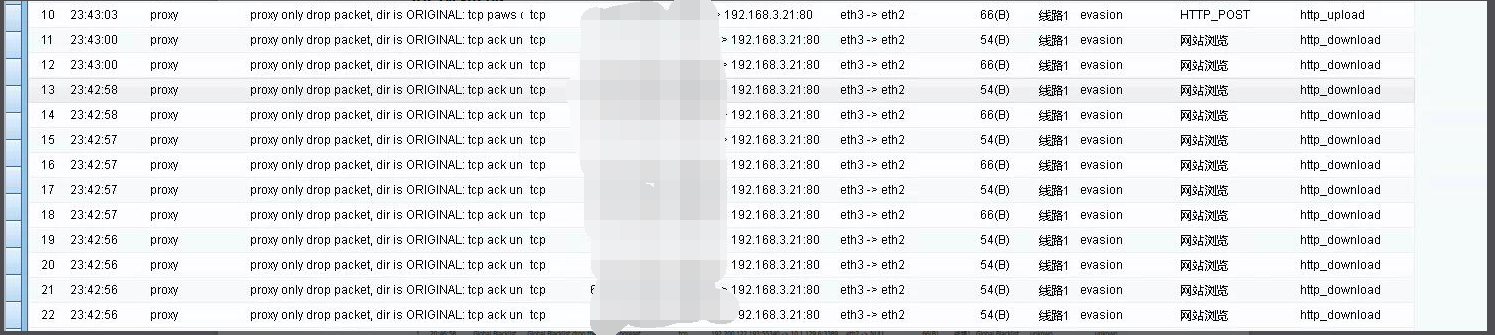
316555b6453409ea58.png (363.13 KB)
Process——
- Turn on the direct packet loss flag to prompt "evasion".

712145b6453909e769.png (358.02 KB)
2、
① Take the standard version AF7.3 as an example: Abnormal packet detection in [System] – [System Configuration] – [Network Parameters] Abnormal packet detection
② Take the standard version AF7.5 as an example: Abnormal packet detection in [System] – [System Configuration] – [General Configuration] – [Network Parameters] Abnormal packet detection
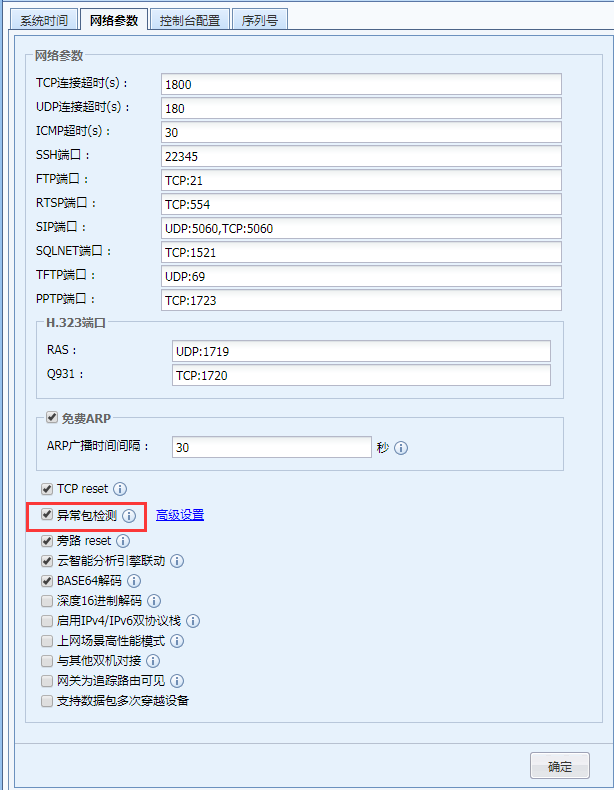
249885b64596a2a125.png (68.38 KB)
- Disable abnormal packet detection
Root cause
Enabling the abnormal packet detection function will discard TCP packets that do not conform to the normal state. If the business can use the abnormal state TCP protocol, it is recommended to disable the corresponding abnormal packet detection option.
solution
① Take the standard version AF7.3 as an example: Abnormal packet detection Uncheck the abnormal System detection under [System] – [System Configuration] – [Network Parameters]
② Take the standard version AF7.5 as an example: Uncheck the abnormal packet detection in the abnormal packet detection under [System] – [System Configuration] – [General Configuration] – [Network Parameters]

599145b6458a5b7132.png (67.81 KB)
Original Link
https://support.sangfor.com.cn/cases/list?product_id=13&type=1&category_id=238&isOpen=true