
[AF] OSPF Network configuration publishes Network Segment, but no network segments are generated in the Interfaces configuration
Problem Description
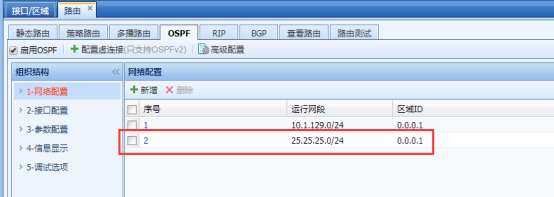
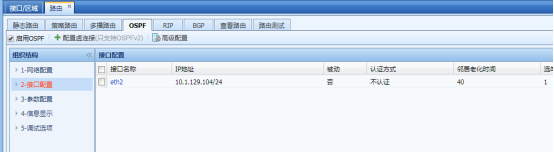
After the Network segment is published in the OSPF network configuration, no network segment is generated in the Interfaces configuration, as shown below:
Network settings:
938095b9f1343067d8.png (36.98 KB)
Interfaces configuration:
793845b9f134f544b4.png (25.16 KB)
Process——
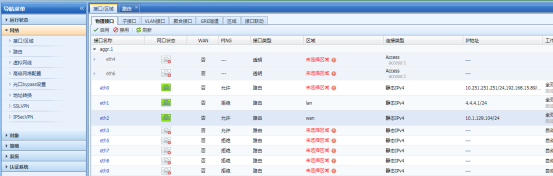
Check in [Network]–>[Interfaces/Zones] Medium there is no corresponding 25.25.25.0/24 Network Segment IP configured on the Interfaces, as follows:
809665b9f1362a62b0.png (40.55 KB)
Root cause
The device generates the Interfaces configuration for OSPF, which requires this IP to be associated with the interface corresponding to the device (either a physical Interfaces or a virtual Interfaces).
solution
- You need to add the Network Medium be published in [Network]–>[Zones] as follows:
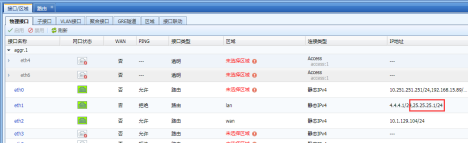
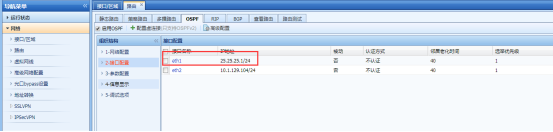
978935b9f139d2402d.png (24.79 KB) - Then you can see the Interfaces configuration information in [Interfaces Configuration], as follows:
490535b9f13afb4c8a.png (24.92 KB)
Suggestions and Conclusion
AF supports publishing the Network Segment of the IP on the non-device Interfaces, but AF needs to modify the network type of the Network Segment and the IP needs to be configured on the AF Interfaces.
Original Link
https://support.sangfor.com.cn/cases/list?product_id=13&type=1&category_id=390&isOpen=true