
[AF] PDLAN cannot connect to the headquarters, prompting that the headquarters serial number is full
Problem Description
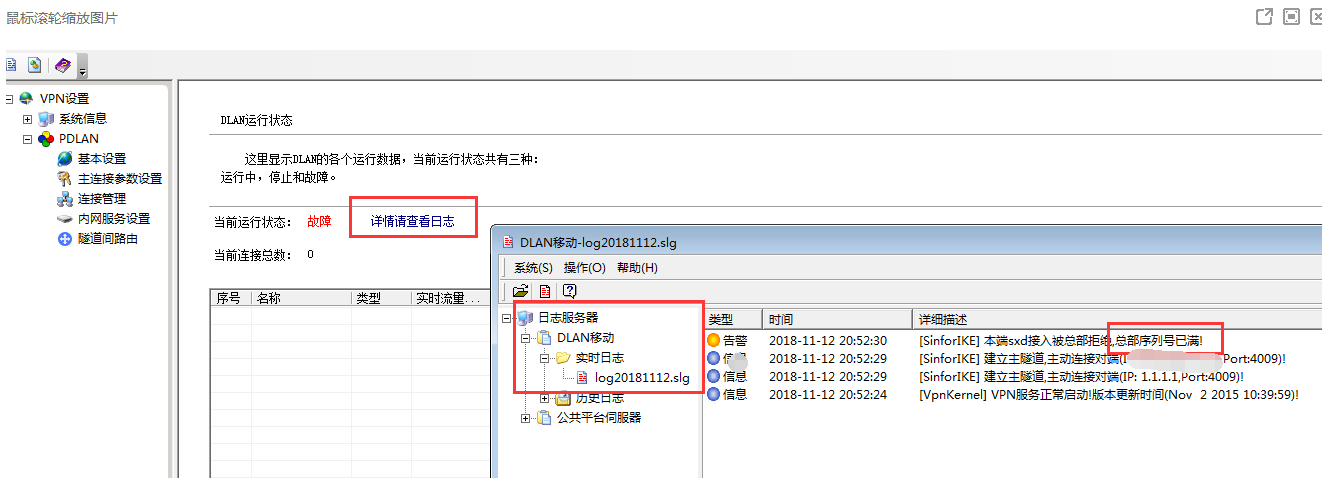
Using PDLAN to access the intranet, PDLAN connection fails
501235beebd88bfcbc.png (73.52 KB)
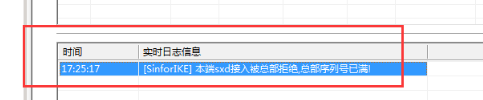
Warning Info
Query path PDLAN-[Please check the log for details]-[Logs server]-[DLAN mobile]-[Real-time Logs]-click the corresponding Logs
511165bee2e68c2dfa.png (11.16 KB)
Process——
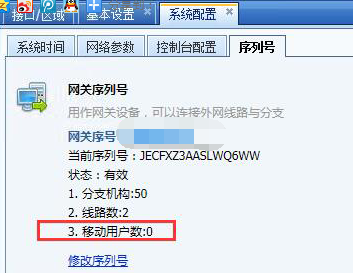
Check that the corresponding headquarters AF has user configuration, the branch PDLAN configuration is correct, and the VPN cannot be established. Later, it is found that the number of mobile users in the serial number is 0.
251675bee31b84148b.png (87.56 KB)
PS Serial number viewing path:
① Take the standard version AF7.3 as an example: In [System] – [System Configuration] – [Serial Number], click Modify Serial Number and fill in the corresponding serial numbers.
② Take the standard version AF7.4 as an example: In [System] – [System Configuration] – [General Configuration] – [Serial Number], click Modify Serial Number and fill in the corresponding serial numbers.
Root cause
To use the pdlan client to access the VPN, you need to purchase a mobile user license
solution
It is recommended to contact a local company or agent for processing
Original Link
https://support.sangfor.com.cn/cases/list?product_id=13&type=1&category_id=460&isOpen=true