
[AF] Policies Layer 3 does not take effect due to incorrect destination address configuration
Problem Description
Source address Policies Layer 3 is configured to direct Host Network to the Unicom exit, but it is found that intranet users still access the Internet through other exits.
Process——
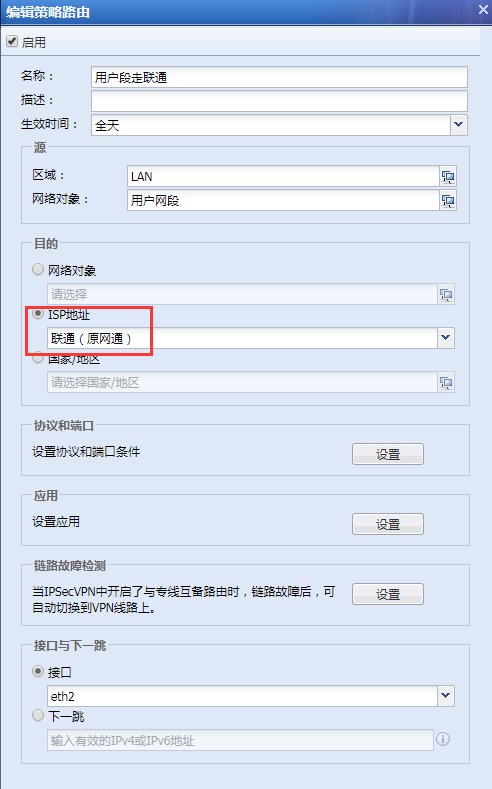
- Take the standard version AF7.4 as an example: Check the policy routing configuration in [Network] – [Layer 3] – [Policies Layer 3], and find that the Internet traffic of intranet users goes through the Policies Layer 3 of China Unicom's export, and the destination address is configured as "China Unicom (formerly Netcom)", as shown in the following figure:
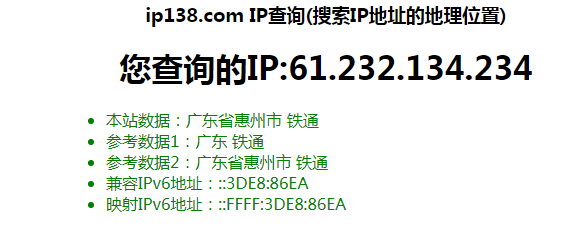
246175bb069e8c789d.png (56.49 KB) - The external public network IP address visited: 61.232.134.234 is searched on www.ip138.com and found to be the IP Address of China Tietong, as follows:
322155bc9c025bb2e0.png (29.8 KB)
Root cause
When intranet users access the Internet through China Unicom's Policies, the destination address selected is "China Unicom (formerly Netcom)", which results in the traffic of intranet users accessing non-China Unicom addresses not matching the Policies Layer 3.
solution
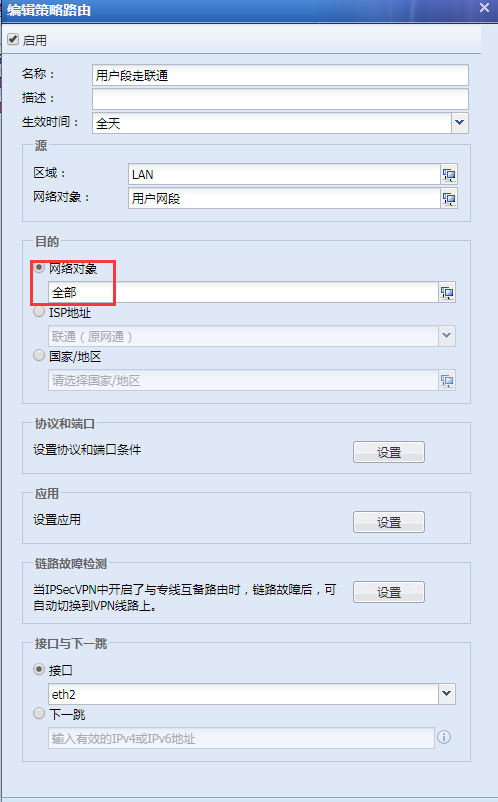
Take the standard version AF7.4 as an example: Check the Policies routing configuration in [Network] – [Layer 3] – [Policies Layer 3], and change the policy Layer 3 destination address of the intranet user's Internet traffic to Unicom's exit to all to restore to normal, as shown in the following figure:
745235bb06a7f9a406.png (56.76 KB)
Original Link
https://support.sangfor.com.cn/cases/list?product_id=13&type=1&category_id=422&isOpen=true