
[AF] Routing between tunnels is unavailable and routing is not enabled
Problem Description
The customer’s Network environment is: AF1–WOC–AF2. IPSec VPN has been configured between AF1 and AF2 and WOC and they can communicate. Now AF1 and AF2 need to communicate through WOC as inter-tunnel Layer 3. Both ends are configured, but AF1 cannot ping the intranet port of AF2.
Warning Info
AF1 inter-tunnel routing settings:

96455b5314eaf1255.png (13.61 KB)
AF2 inter-tunnel routing settings:

573165b53150dcdadb.png (12.21 KB)
Process——
- Check Layer 3 and find that there is no route to the other end.
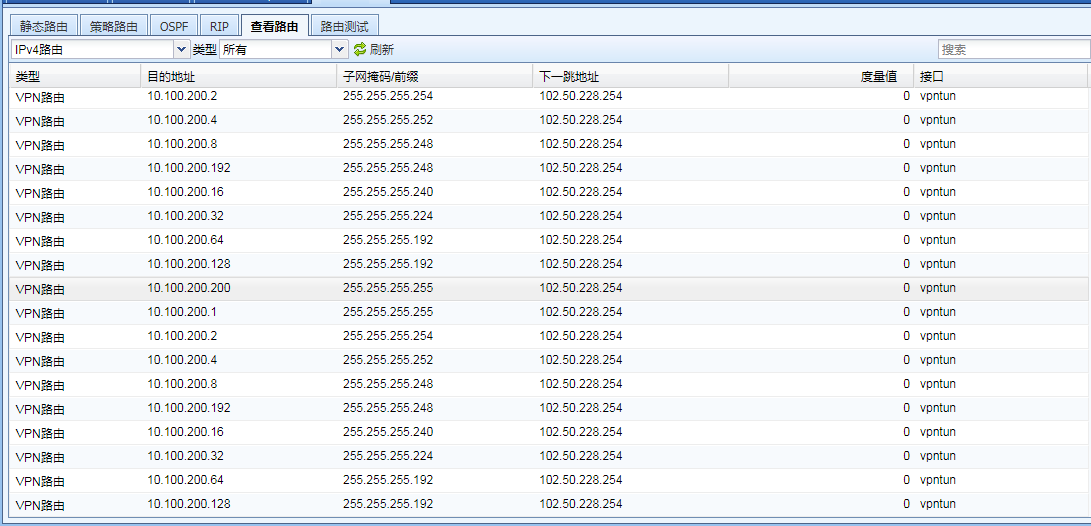
796955b53141f131a8.png (83.93 KB) - Check the inter-tunnel routing of AF1 and find that routing is not enabled. After enabling the Layer 3, it is found that the route has been found in the Layer 3 table and communication is possible.

631885b53143fc4d1f.png (17.87 KB)
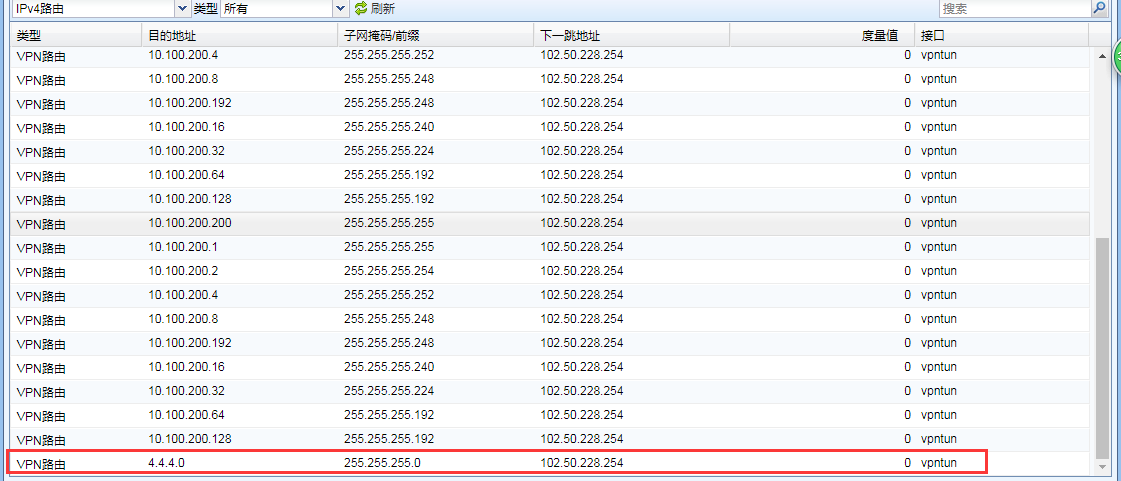
424805b531465e14b3.png (80.6 KB)
Root cause
There is no route from AF1 to AF2.
solution
As shown in the figure below, Enable Layer 3 needs to be checked to enable AF1 and AF2 communication.

507045b531439cb2dc.png (17.87 KB)

893195b5315a518096.png (14.42 KB)
Original Link
https://support.sangfor.com.cn/cases/list?product_id=13&type=1&category_id=133&isOpen=true