
[AF] Routing Priority issue when inter-tunnel routing is not effective
Problem Description
AF8.0.69 configuration of inter-tunnel routing does not take effect when going to the headquarters to access the Internet
Effective troubleshooting steps
- Check whether the inter-tunnel Layer 3 configuration is correct
- Capture packets to see the direction of data flow and whether it goes to the external network port or the VPN port.
- Layer 3 test or Layer 3 check whether there is a corresponding VPN Layer 3
Root cause
- The Layer 3 of inter-tunnel routing and static Layer 3 is the same. When capturing packets, we can see that the Policies Layer 3 is used instead of the vpntun port.
- Policies Layer 3 cannot select the Interfaces as the vpntun port, which needs to be enabled in the 8.0.82 version Command Line line
solution
- Upgrade to version 8.0.82 (pull up R&D to ensure upgrade)
- Create a policy Layer 3 in the Policies:
admin#config (enter config mode)
config#pbr aaa (aaa is the Policies Layer 3 name)
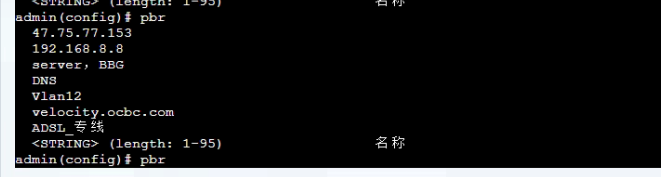
admin (config-pbr-aaa) nexthop gateweay 200.200.200.200 interface vpntun (the next gateway is configured as the external network gateway, and Interfaces interface is the vpntun port)

- Check whether the creation is successful: show pbr
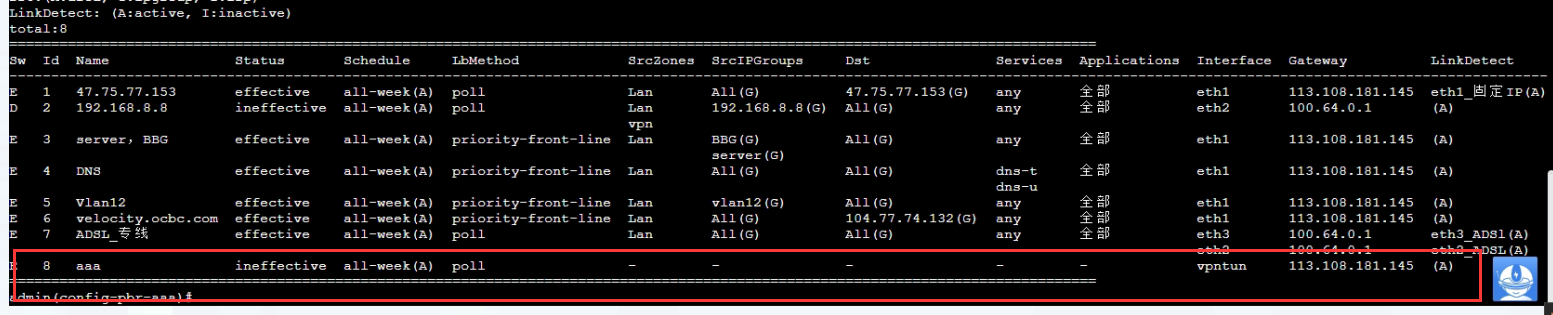
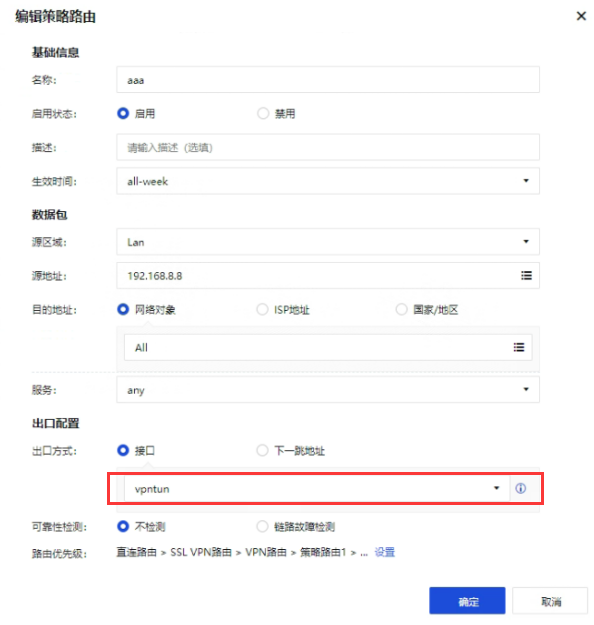
- Edit the policy routing object aaa in the Policies Layer 3 Objects.

- After Network Objects network object related configuration, you can test it
Operation Impact Scope
Creating Policies Layer 3 will not affect the business. Editing the network objects for the VPN tun port on the front end will cause Network fluctuations. It is recommended to communicate with the customer before operating.
Original Link
https://support.sangfor.com.cn/cases/list?product_id=13&type=1&category_id=2434&isOpen=true