
[AF] Some intranet IPs are abnormally connected to the Internet, virtual IP and intranet conflicts
Problem Description
AF is used as the gateway. The intranet 192.168.100.0/24 Network Segment tested the addresses 192.168.100.20-192.168.100.30 and failed to access the Internet.
Process——
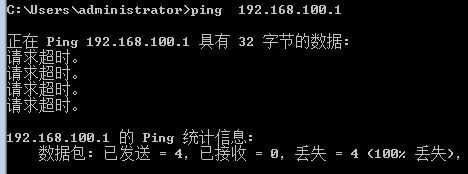
- Configure the computer to 192.168.100.20 and test the ping address of the gateway AF. The ping test fails, but ARP is learned (enter the command arp -a to view).
791035b7048b4178a3.png (8.64 KB)

398255b7048c3a92bb.png (4.34 KB) - Check the AF Network in [Network Configuration] – [Layer 3] – [All Routes] and find that Sensitive a route with the corresponding address pointing to the VPNTUN Interfaces.

260005b7046d0eb2fc.png (15.8 KB) - Check the VPN configuration in [VPN]-[IPSec VPN] and find that the corresponding address is configured Medium [Virtual IP Pool]. After changing it to an address not used in the intranet, the intranet can be used normally.

978045b70473ba2b2f.png (9.73 KB)
Root cause
Configuring the address of the virtual IP Address pool will generate a VPN Layer 3. The VPN Layer 3 takes precedence, causing the data return packet to go through the VPN Interfaces
solution
Change Virtual IP Pool address to a non-intranet address
Suggestions and Conclusion
When configuring the VPN Virtual IP Pool, you need to configure the non-intranet Network Segment
Original Link
https://support.sangfor.com.cn/cases/list?product_id=13&type=1&category_id=280&isOpen=true