
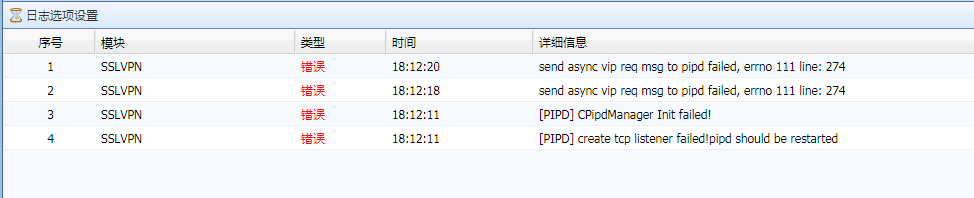
[AF] SSL VPN cannot access resources, System log error [PIPD] create tcp listener failed! pipd should be restarted
Problem Description
The customer uses sslvpn on AF to publish intranet resources. He can dial into the VPN normally and Obtain the virtual IP Address, but cannot access the resources.
Warning Info
The System fault Info contains error information, as follows
962705e6a0bd24b6c3.png (20.35 KB)
Process——
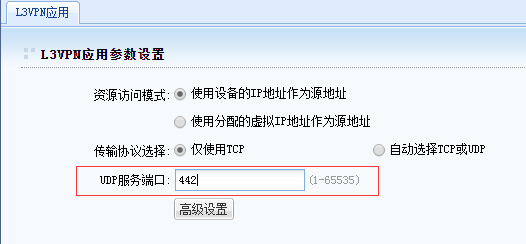
By checking and testing the relevant configuration Info, it was confirmed that the [Resource Options]-[UDP Services Port] under the SSL VPN configuration menu was changed to another port. This port was already used by another AF System, resulting in a port conflict.
963995e6a0c846975f.png (11.53 KB)
solution
Restore the SSL VPN Resource Options configuration and set the UDP Services port to 440.
Original Link
https://support.sangfor.com.cn/cases/list?product_id=13&type=1&category_id=814&isOpen=true