
[AF] Standard IPSEC establishment failed: Aggressive mode cannot find a matching peer ID
Problem Description
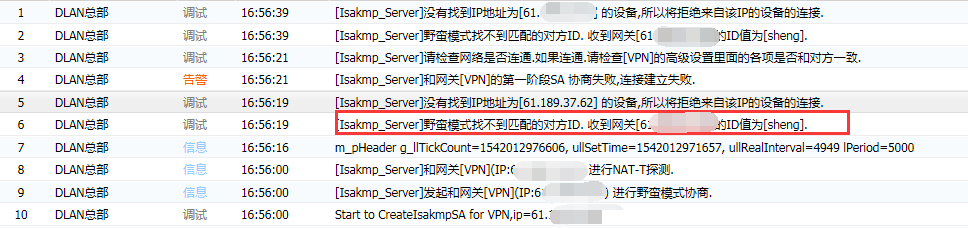
Standard IPSEC establishment failed: Aggressive mode cannot find a matching peer ID
Warning Info
358315be9761e51344.png (31.68 KB)
solution
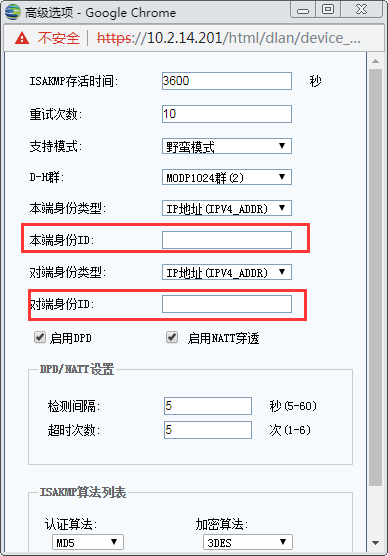
Check [Network] – [IPSec VPN] – [Third-Party Connection] – [Phase 1] – Device List Settings – [Advanced] – and change the local ID and peer ID to be consistent with the peer.
817855be9779745c17.png (12.71 KB)
Suggestions and Conclusion
When a company's equipment is connected to other manufacturers using the third-party standard IPsec, if the connection fails, check the log error prompts and open the debug log to see the specific error prompts. If the error parameters are inconsistent, let me modify them to be consistent with the other end or negotiate with the other end to modify them. If the configuration parameters are confirmed to be correct but the connection still fails, it is recommended to call 400-630-6430 to negotiate with our engineers to handle it.
Original Link
https://support.sangfor.com.cn/cases/list?product_id=13&type=1&category_id=484&isOpen=true