
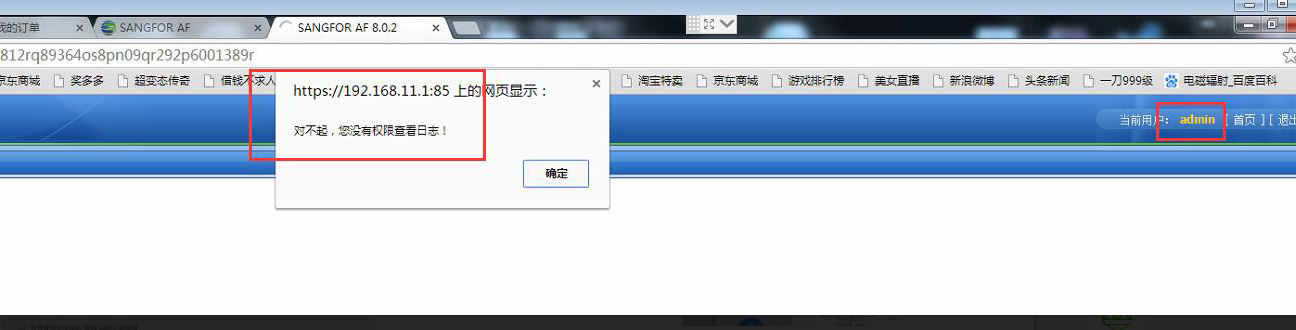
[AF] The built-in data center prompts “You do not have permission to view Logs”
Problem Description
The built-in data center log cannot be viewed using the admin user. The customer said that the device had an abnormal power outage the day before, causing the device to shut down abnormally.
Warning Info
968965c1cd554e5d72.png (175.85 KB)
Process——
-
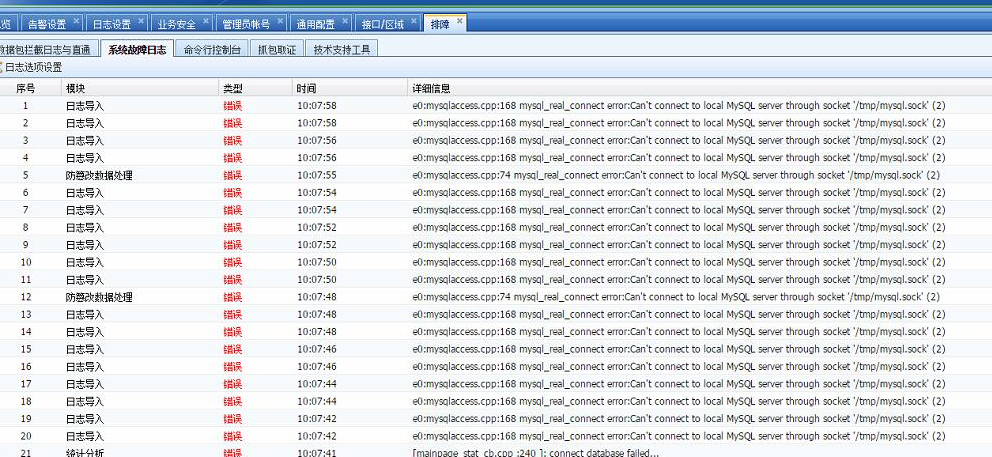
Check [Troubleshooting] – [System Fault Log]
372485c1cd5c991e52.png (597.02 KB) -
Error message: Can't connect to local MySQL server through socket '/tmp/mysql.sock
Root cause
The device is powered off abnormally, causing damage to the device operation files
solution
It is recommended to delete the log and reset the database:
- Before AF7.2, it is recommended to contact 4006306430;
- Starting from AF7.2 version, the interface supports resetting the database:
① Take the standard version AF7.3 as an example: you can enter the admin user password in [Maintenance] – [Technical Support] – [Reset Database]
② Take the standard version AF7.4 as an example: you can enter the admin user password in [System] – [Troubleshooting] – [Technical Support] – [Reset Database]
**Note: Resetting the database will delete the logs and cannot be restored, so please consider carefully! **
Suggestions and Conclusion
It is recommended to use an external data center for log backup in the early stage.
Original Link
https://support.sangfor.com.cn/cases/list?product_id=13&type=1&category_id=577&isOpen=true