
[AF] A large number of public IP addresses are not protected in the pending issues
Problem Description
In Security Operations>Pending Issues, a large number of public network IPs are not protected, as follows: 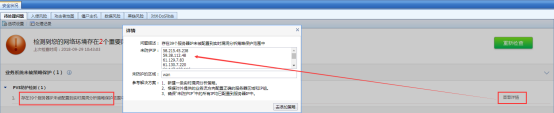
Process——
- It is found that there is no problem with the server zone and server IP group in Scanners>Realtime Vulnerability Analysis, and there is no public IP address, as follows:

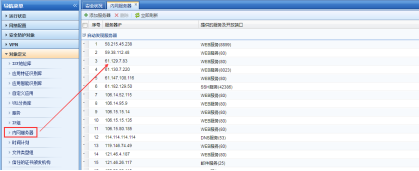
- In Objects>Intranet Servers, it is automatically found that there is a large number of public network IPs, as follows:
Root Cause
The [Pending Issues] function will automatically check whether the manually and automatically configured IP Services of the [Intranet Server] are in the server IP group for Passive Vulnerability Scan, because AF itself does not know which network Network Segment are configured in the intranet.
Solution
In [Objects Definition]–>[Intranet Server], exclude the automatically detected public IP. Starting from version 7.1, you can manually specify the range of automatic device scanning, as follows: 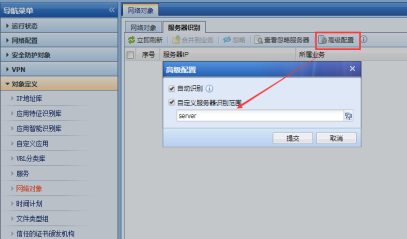 493225baeebc80e7fa.png (35.65 KB)ps: AF7.1 to AF7.3 versions are configured in [Objects Definition]–>[Network Objects]; Starting from AF7.4, the configuration is done in [Objects]–>[Network Objects].
Suggestions and Conclusion
If you do not specify a range, the device will scan the bidirectional traffic between the external network and the internal network by default to see if it has the characteristics of a server. When configuring the Local, it is recommended to manually set the internal network scanning IP range in [Server Identification] (called [Intranet Server] in the old version).
Original Link
https://support.sangfor.com.cn/cases/list?product_id=13&type=1&category_id=421&isOpen=true