
【NGAF】BNAT is not Working on Certain Environment
Issue Description
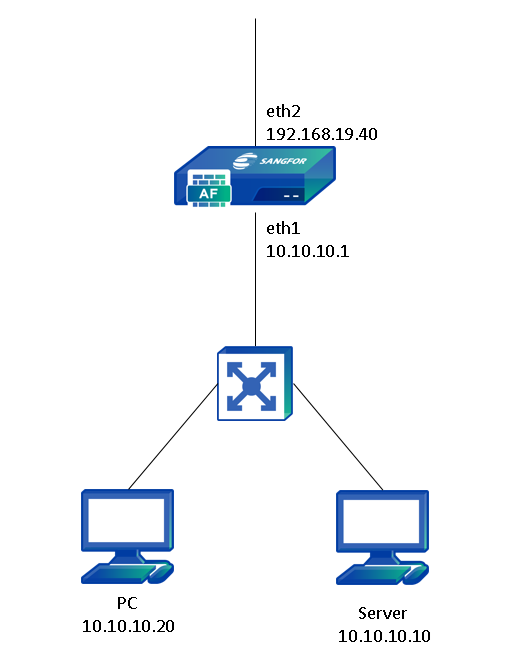
The customer requirement is to access the server port 445 by using public IP, but the result will fail.
Handling Process
- Check the BNAT policy.
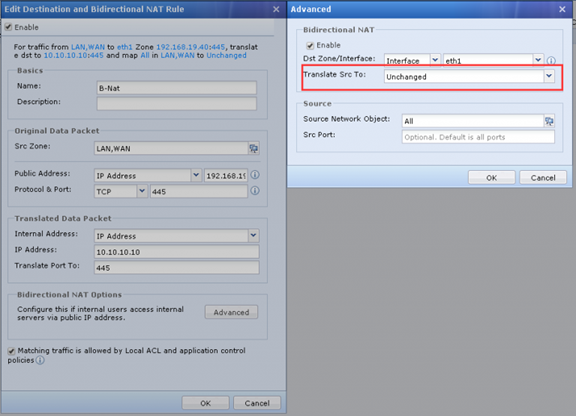
- From the policy, we notice that the BNAT has been enabled but the Translate Src To option is set to Unchanged.
Root Cause
After analyzed on the environment and the BNAT policy, we found that the issue is caused by the configuration error. This is because the Translate scr To option is configured to Unchanged, so it will be using original host IP to access the server. When the PC and the server are in the same network segment, the return traffic from server will not return the firewall, it will direct forward back to PC via layer 2. It will cause 3 way handshake failed.
Solution
The solution is changing the Translate Src To option to Egress interface, so it will use firewall IP to access the server instead of host IP, then the return willsendback to the firewall.