
【NGAF】Cisco IPsec VPN Troubleshoot
Issue Description
The customer has tried to configure IPsec VPN Sangfor to Cisco, based in logs the tunnel has been built but they can’t see the connection in status tab.
The NGAF version is 8.0.6.
Handling Process
-
Verify configuration in both NGAF and Cisco. Should the configuration is consistent with each other, proceed to next step, packet capture.
-
Before starting to capture the packet, with the client’s permission, stop the VPN service. This is to ensure we are able to packet capture the whole VPN establishment packets.

-
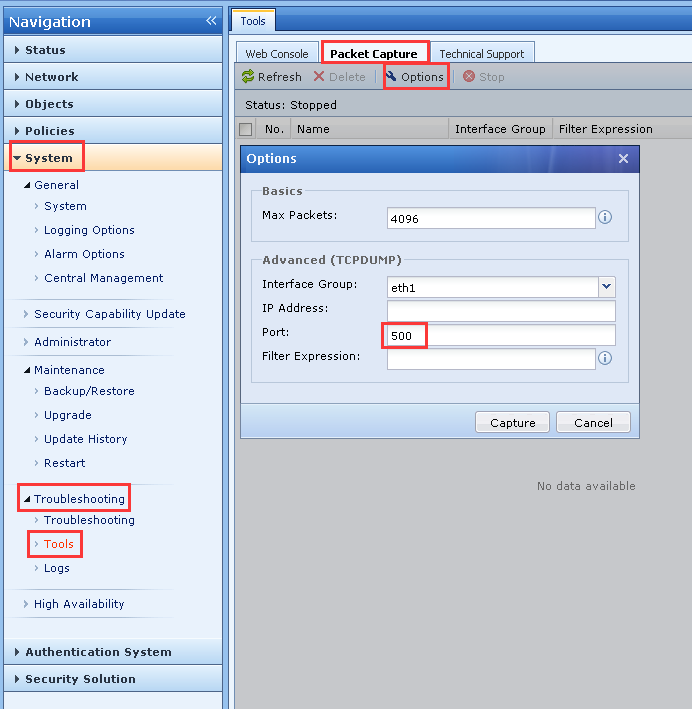
Packet capture on port 500. Refer to the following image:
-
Download the captured packet and view by using WireShark.
-
The information in phase 1 is matches and have 6 main mode. IPsec VPN have main mode and aggressive mode. Now, this NGAF is using the main mode so the 6 main mode shown in the picture mean phase 1 is built successfully. For aggressive mode, there will show 3 aggressive if phase 1 is built successfully.

-
For phase 2, we found that the Sangfor NGAF sends a quick mode packet to Cisco but Cisco did not reply with a quick mode. Therefore, the problem may occur in phase 2.

Root Cause
The NGAF and Cisco phase 2 has the wrong configuration.
Solution
After checking the configuration of Cisco, found that the NGAF phase 2 has configured a wrong network segment. Other than that, Cisco phase 1 has open PFS and configured DH group but phase 2 did not. So, this causes the match is unsuccessful and the VPN unable to build. Therefore, We modify phase 2 in Cisco to open the PFS and configured a DH group.
Suggestions
For the packet capturing, we assume that there is only one VPN tunnel.
However, in the situation that the client has more than one VPN tunnel and is running production on the VPN, do not request for the client to turn off the VPN.
Packet capture with more specific expression such as public IP of opposite device and port number.