
【NGAF】Disk usage show on UI higher than the auto delete threshold
Issue Description
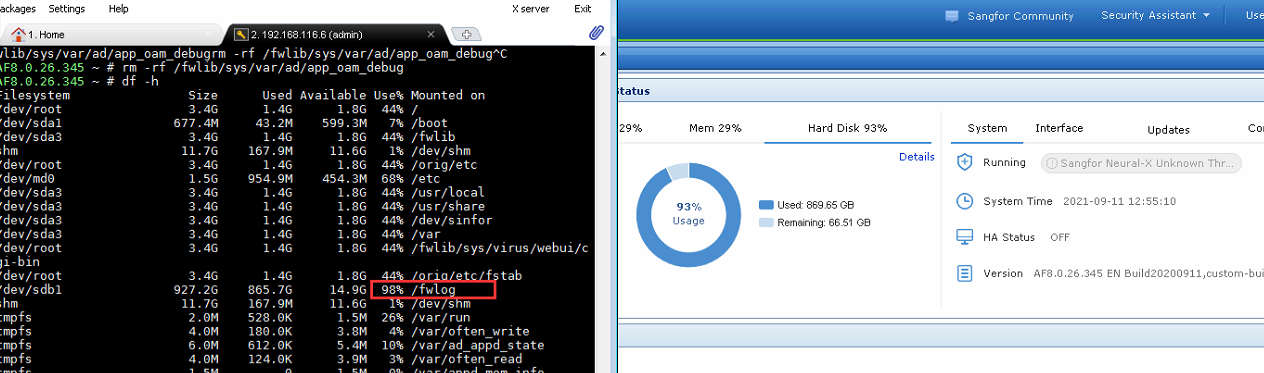
Customer found that disk usage show on UI higher than the auto delete threshold, found that its the blockbox log occupying the space
Error/Warning Information
Handling Process
- Check on the logging option, the Log deletion is enabled and threshold set to 70%
- Check df -h, found that /fwlog partition is used up to 98%
- After checking, found that its blacbox iprule file occupying the spaces
- Delete the iprules file in backend (Note: Before delete, please get approval from customer/partner)
- After deleted the file, install the patch to restrict the iprules file size, so that it will not occupy the space again
Root Cause
Routing keep changing and caused the iprule file occupying the spaces
Solution
- Delete the iprule file in backend, after that install the patch to restrict iprule file size.
KB-AF-20210911-Universiti_Malaysia_Pahang-001.ssu
Suggestions
- Before deleting the iprule file, please confirm with the customer or partner and get approval first.
- After deleting the file, will not be able to trace back that day routing log.