
【NGAF】Failed to Build IPSEC Vpn Due to Daemon Process Starting Error
Issue Description
Failed to build IPSec VPN because of daemon process starting error.
Handling Process
-
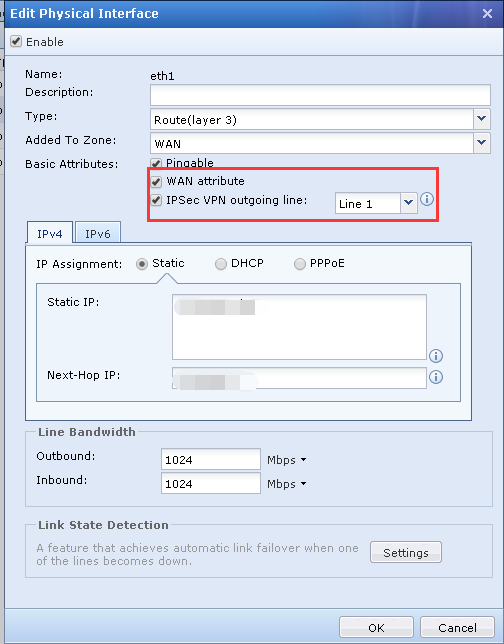
Check interface configuration, make sure WAN attribute are checked and IPSec VPN outgoing line are checked and the line is correct.
-
If the interface have many IP(exp:192.168.1.2-192.168.1.5/255.255.255.248). Do not put range IP on first line. In another word first line fill with single IP, second line onwards can fill with IP range. This is because the VPN port will only listen on the first IP.
-
Check the outgoing line on Phase 1, make sure the line is available.

-
If there is only one line in the WAN, do not require to configure the VPN Multiline Options. If it is checked, then it must be equipped with one multiline.
For example, if there are multiple WAN, the VPN multiline configuration need to checked and configure multiple lines, the multiline policy configuration interface will activated. -
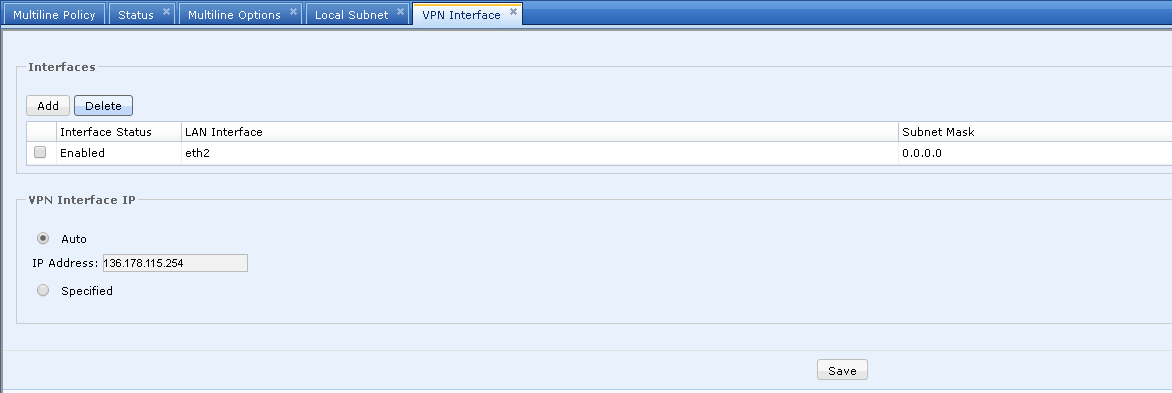
VPN interface need to be configured.
Root Cause
The outgoing line configured on Phase 1 not match with the actual outgoing line on WAN interface. In another word the outgoing line configured on phase 1 does not exist.
Solution
Change the outgoing line on Phase 1 to the line that configured on WAN interface or if you have multiple lines, choose the available line.