
【NGAF】Failed to obtain Internet Time in Sangfor updater
Issue Description
Failed to obtain Internet Time in Sangfor updater
Error/Warning Information
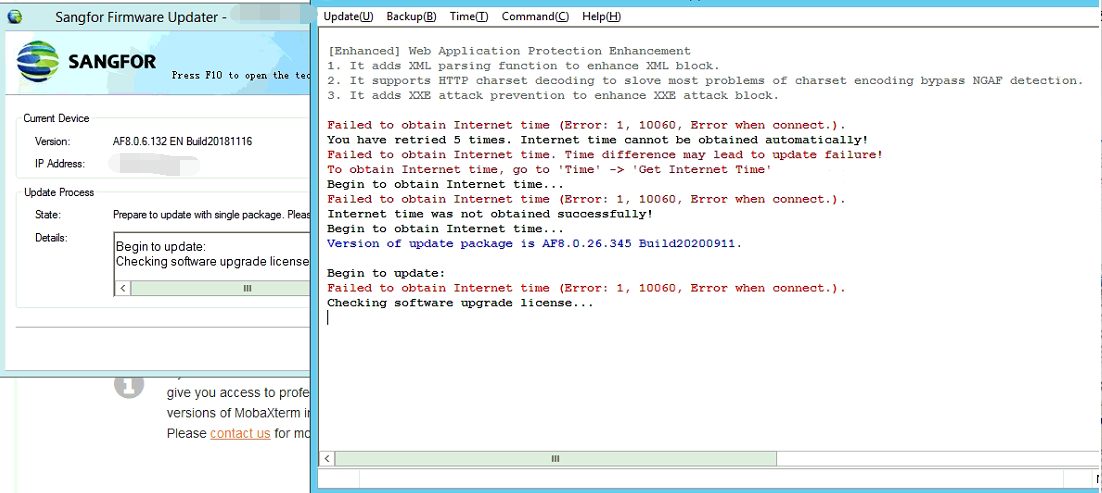
Handling Process
- Perform checking, confirmed PC able to access internet.
- Tried to do setting based on the error message, however issue persisted.
- Perform packet capture on PC, found unable to reach uptime.sangfor.net & uptime.sangfor.net.cn.
- Tried to whitelist these domains on NGAF, found issue persisted.
- Perform wget and ping test on PC and NGAF, found both device unable to access to these domain.
- Perform wget and ping test with every wan line of NGAF accordingly, found one of the wan line able to access to these 2 domain.
- Do SNAT and PBR for that PC that used for upgrade to use that particular wan for upgrade.
- The Internet Time error didnt show up and able to proceed firmware upgrade successfully.
Root Cause
ISP blocked the access to these 2 domain below
uptime.sangfor.net & uptime.sangfor.net.cn
Solution
- Check with ISP side to unblock the domains.
- Have direct connection to NGAF management port and connect the PC to 4G internet for upgrade.
- Find and use the WAN line that do not block these 2 domain for upgrade.