
【NGAF】GS Wave IP Phone Unable to Connect to the SIP Server Using External IP
Issue Description
User want to use mobile GS Wave app to connect to their external SIP server and make call, but it failed to connect to their SIP server.
Handling Process
- Confirm LAN user able to connect to SIP server through Server’s internal IP.
- Try to disable the SIP in NGAF, but still unable to connect.
- Enable the bypass function, there is no packet drop.
- Found that it might cause the NAT configuration error.
- On the NAT policy, try to select all protocol in NAT and change DNAT to BidirectionNAT.
- After the changes, found that user able to connect to the SIP server using external IP, but during call has no sound.
- Enable the SIP in the NGAF. (SIP need to enable in NGAF if it didn’t enable in the server.)
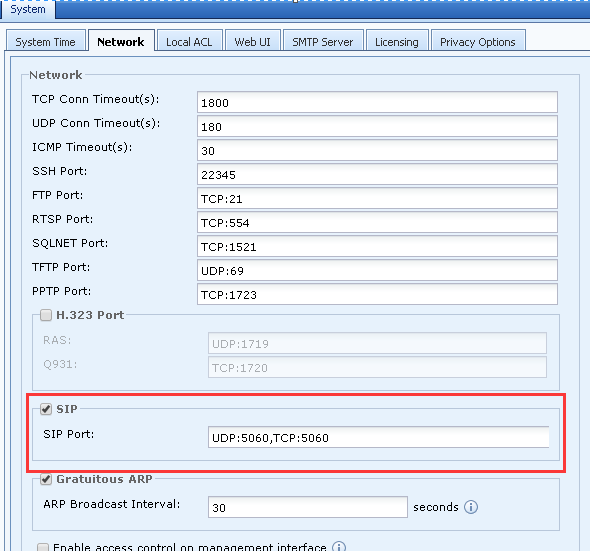
- After that, the mobile app call is back to normal
Root Cause
It might cause by the NAT configuration error in this case, since they able to use the SIP to make call using SIP internal IP.
Solution
- Try to select all protocol in NAT and change DNAT to BidirectionNAT.
- Found that user able to connect to the SIP server using external IP, but during call has no sound.
- Enable the SIP in he NGAF. (SIP need to enable in NGAF if it didn’t enable in the server.)
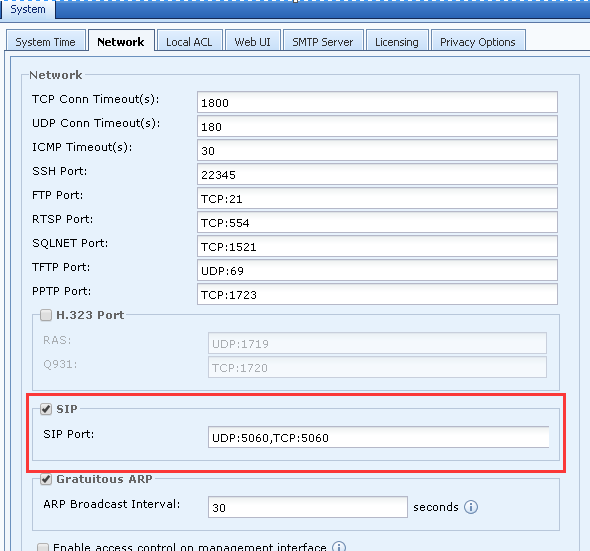
- If user able to make call with above configuration, then try to specific port that needed in NAT.