
【NGAF】IE Browser Access SSL VPN Unable to Enter Username
Issue Description
IE browser access SSL VPN Unable to enter username.
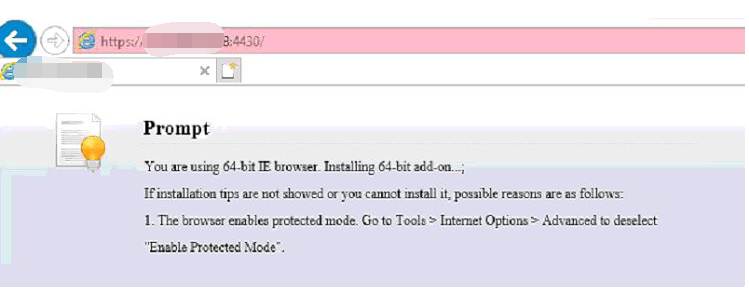
The error messages prompt: You are using 64-bit IE brower. Installing 64-bit add-on.
Handling Process
- Try to use other PC can access SSL VPN, This indicates that the SSL VPN service on the NGAF device is normal. This issue may be related to a specific PC.
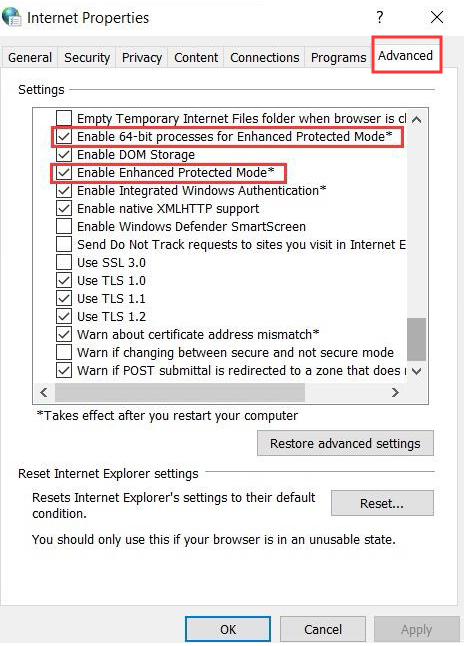
- Open IE browser, go to Tools > Internet Options > Advanced select “Enable 64-bit process for Enhanced Protected Mode” and “Enable Enhanced Protected Mode”.
Root Cause
SSL VPN controls are 32-bit programs, but IE browser settings prohibit enable 32-bit programs.
Solution
Open IE browser, go to Tools > Internet Options > Advanced select “Enable 64-bit process for Enhanced Protected Mode” and “Enable Enhanced Protected Mode”.