
【NGAF】Installed Easyconnect But Keep Prompting Download Easyconnect
Issue Description
The user has installed Easyconnect, but when accessing NGAF’s SSLVPN with a browser (IE, Microsoft Edge, Google Chrome), it still shows that the client update failed, please download and install Easyconnect again.
Handling Process
- The 360 antivirus software and Windows firewall have been disabled, and the re-installation does not work even after installing Easyconnect as an administrator.
- Use Sangfor helper tool to scan and fix any problem. After the repair, it is still not working.
- Check the 54530 port of the computer and found the ECAgent.exe process is working.

- Try to disable these two options from the Internet settings.
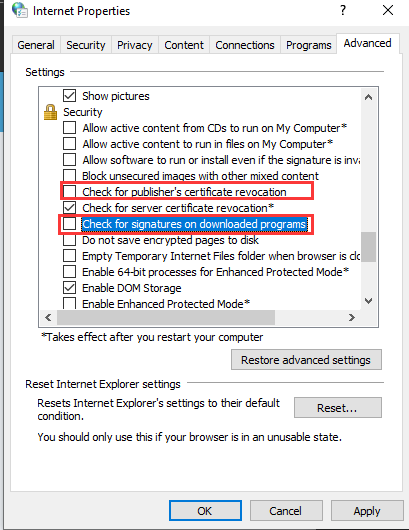
- After disabled it, access NGAF’s SSLVPN again via browser, no more prompt was displayed.
Solution
Disable these two options from the Internet settings.
