
【NGAF】Mikrotik device has been detected as a Botnet attack source
Issue Description
Customer has a Mikrotik device in their network environment, the device have enabled Hotspot function. They found encounter APT attack in their network environment, after that they found that Mikrotik device has been detected as a attack source.
Handling Process
- Check on the APT logs, found that Mikrotik device and a PC has been detected at the same time. Suspect it is because of customer using Mikrotik Hotspot function.

- Try to add the Mikrotik’s IP in to the Local DNS scenario as figure below:
Path: Policies > Network Security > Policies > Advanced
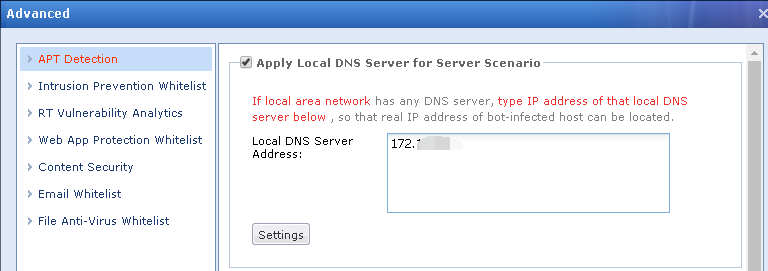
- After the IP has been added, found that the Mikrotik IP didn’t appear after added to local DNS scenario.

- After that, access to the the PC and use Antivirus tool to scan the PC. Below is the scanning result:
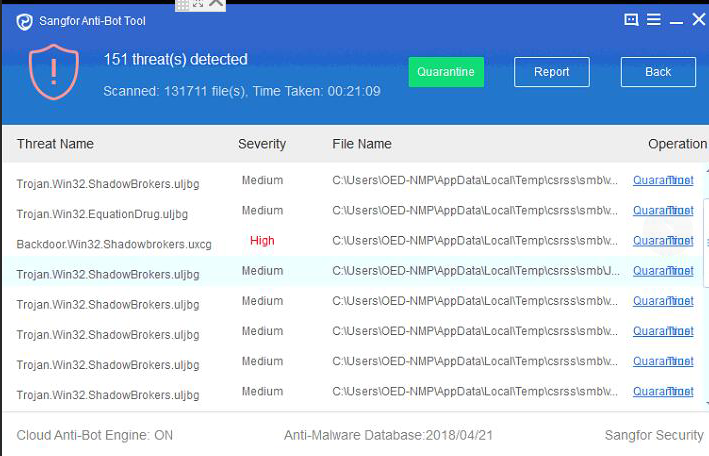
- After that Quarantine all these files, then go to Quarantine zone to remove all files.
- After remove monitor for a day, found that there is no APT log for this PC. Do the same way to other infected PC.
Root Cause
It is because of Mikrotik device’s hotspot function has been enabled, so NGAF have detected the Mikrotik device as the attacker source but actually it is not Mikrotik device access the malicious domain.
Solution
Go to Policies > Network Security > Policies > Advanced, add Mikrotik device’s IP to local DNS scenario.
Suggestions
If customer network environment has DNS server, it is suggest to add the DNS server IP into ocal DNS scenario to avoid the same issue happen again.