
【NGAF】NGAF 8.0.23 SSLVPN unable to get virtual IP
Issue Description
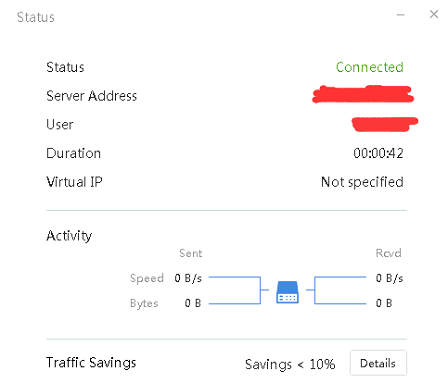
User has connected to SSL VPN on Sangfor NGAF8.0.23 and unable to get a Virtual IP.
Test the same user account on new PC and able to get virtual IP.
Error/Warning Information
Connected to NGAF SSLVPN but didnt get virtual ip.
Handling Process
- Check if the resource is L3VPN resource. If not L3VPN resource, it is not required to assigned virtual IP.
- Check if Sangfor SSL VPN CS Support System VNIC has been successfully installed.
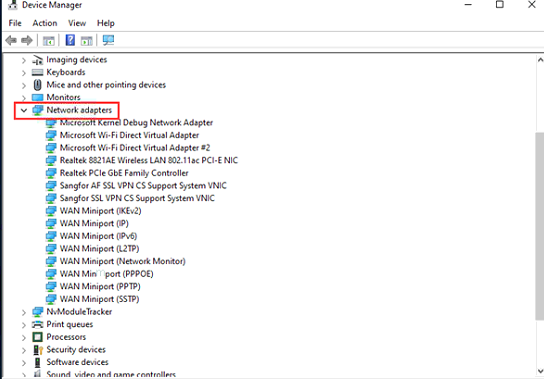
- Check if there are other VPN network adapter or unknown adapter. If yes get approval from client to uninstall the driver. The uninstallation is to check if there is compatibility issue.
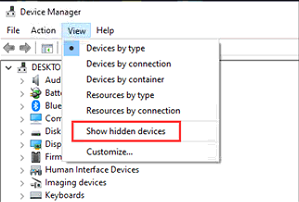
- Suggest to show hidden device as most of the time there are hidden adapters such as AF SSL VPN CS Support System VNIC.
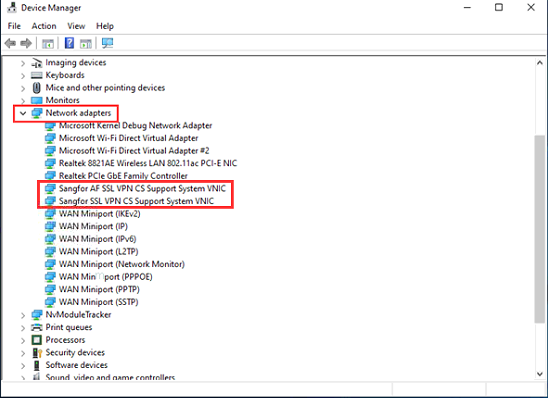
- SSL VPN network adapter is not compatible with AF network adapter. Uninstall one of them based on client requirement. Note: NGAF 8.0.27 and above is using SSL VPN network adapter, suggest to uninstall AF network adapter.
- Relogin to SSLVPN, found able to get virtual IP now.
Root Cause
This issue is due to compatibility issue.
Solution
Uninstall the incompatible network adapter.