
【NGAF】NGAF Cause Email Attachment File Corrupted
Issue Description
Customer environment has a mail server under the NGAF. When they use the mail server to send an email that contains a PDF format file. Although the recipient can receive the email but the file attached with the email cannot be open and it is corrupted.
Handling Process
- Enable bypass for the mail server and the result shows the email file can be open by the recipient.
- Double confirm with the customer which port is used for the mail server.
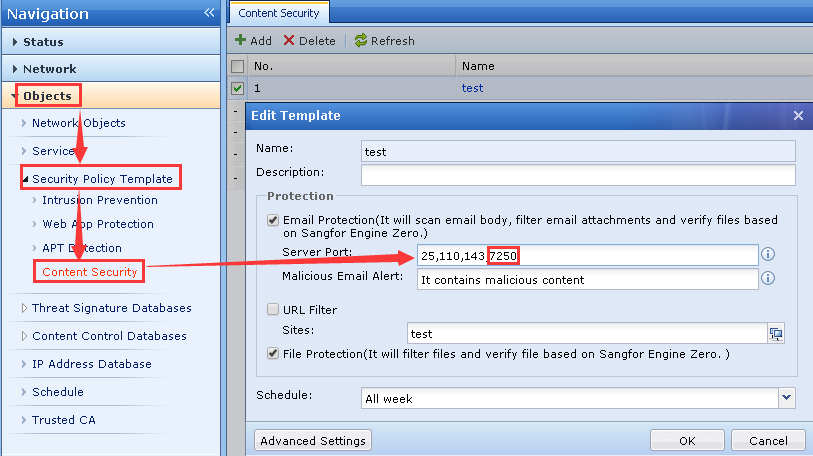
- Go to object > security policy template > content security. Select the template which is used for validating the mail and add the mail server port into the email protection server port section.
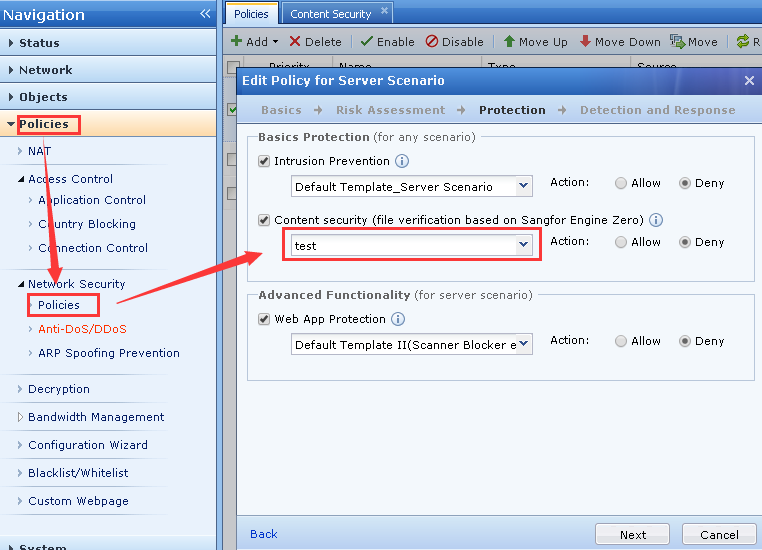
- Go to network security policy and apply this template to the related policy which is used to validate the mail server traffic.
Root Cause
The mail server port is not added to the email protection server port section.
Solution
Add the mail server port to the email protection server port section.