
【NGAF】NGAF unable to create SSL VPN resource
Issue Description
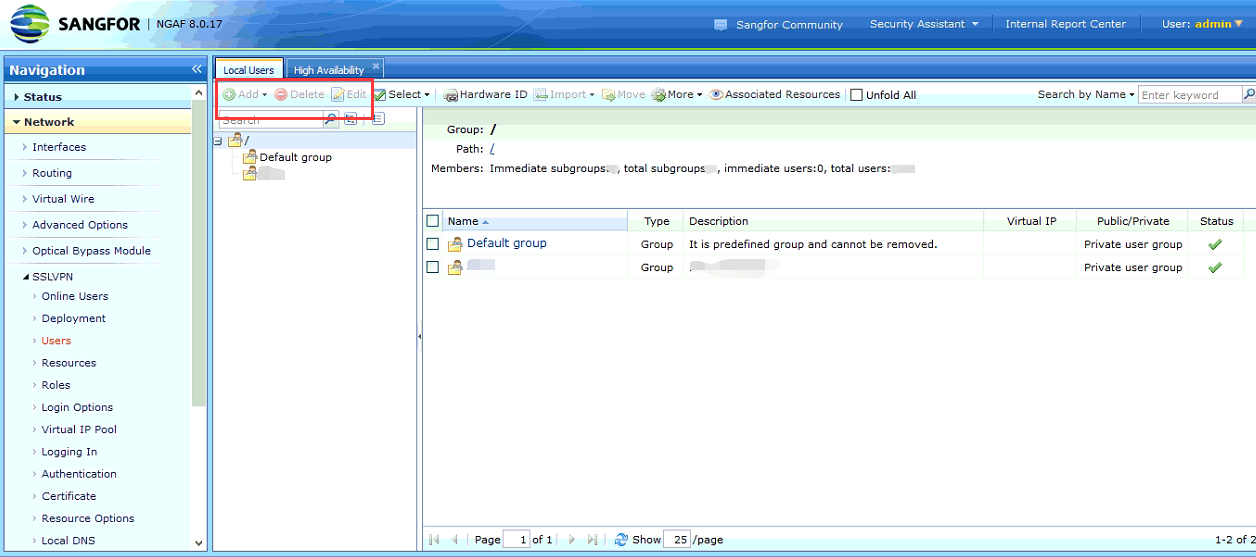
Customer found that unable to add, delete and edit resources.
Error/Warning Information
The button become grey, so that unable to click.
Handling Process
- Check on the account, found that using the admin account.
- Check customer environment, the device in HA environment and the device status is Active.
- Access peer device, check on the status is normal which is standby.
- Check on standby device, found that it also unable to add, delete and edit.
- Go back to active device, then go to System > High Availability > Sync Options and disable the Synchronization.
- After disabled the Synchronization, refresh the page and found that it back to normal which able to click on the button.
- Enable back the Synchronization.
Root Cause
The root cause of this issue is due to the configuration synchronization status is abnormal, caused and both sides become standby controller.
Solution
Disable the Synchronization and re-enable it will renegotiation status of synchronization.