
【NGAF】Upgrade Failed In Appre Due To Enable Second Pass Through
Issue Description
When upgrade prompt error message:Upgrade is not supported because second-passthrough traffic is allowed. Please go to System > General > System > Network and disable it before performing upgrade. As shown below:
Error/Warning Information

Handling Process
- Disable the second pass through option.
Path: System > General > System > Network
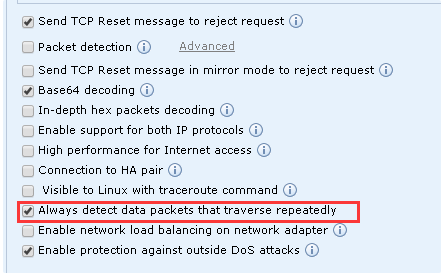
- Perform upgrade again, NGAF able to upgrade successful.
Root Cause
NGAF had enabled the second pass through cause upgarde failed in appre.
Solution
Disable the second pass through option.
Note: In different version will show the naming will be different.