
[NSF/NGAF]EasyConnect cannot connect to SSLVPN server
Issue Description
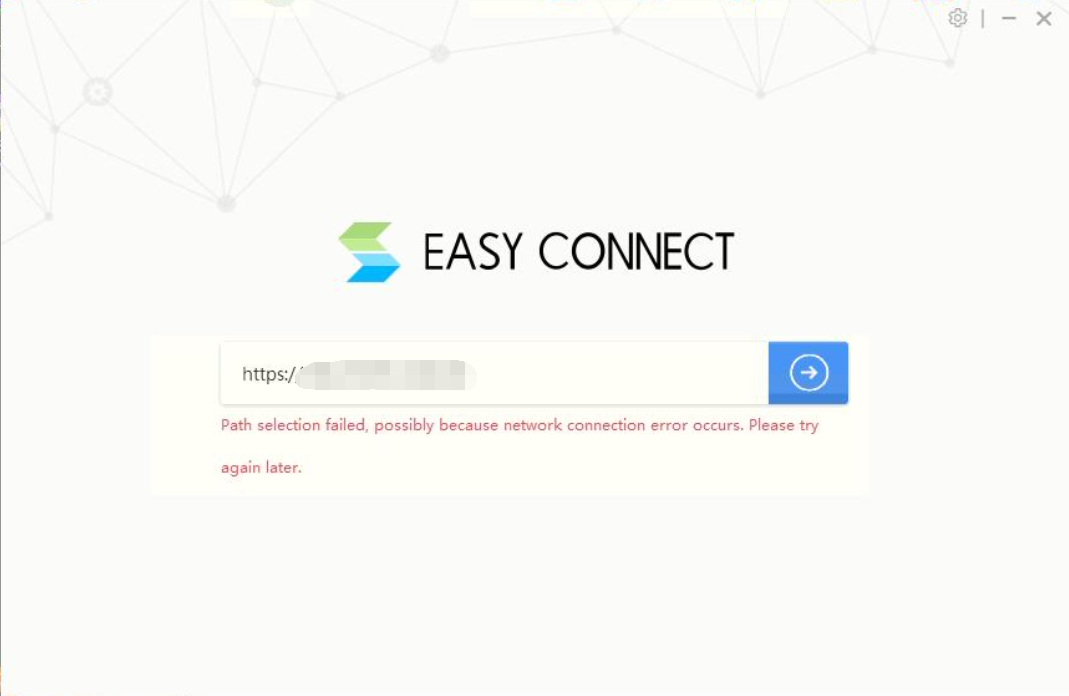
Customer found that EasyConnect unable to connect to SSLVPN server, but when use browser it able to access
Error/Warning Information
Handling Process
- If user using domain name, try to access using public IP but found that result are same.
- Telnet the public IP port 4430, found that result is normal.
- Reinstall EasyConnect, found that result are the same.
- Check on the PC’s adapter, found that there is no other VPN adapter on the device manager.
- Disable antivirus, result are the same.
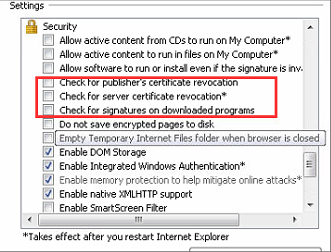
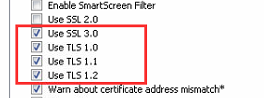
- Open Internet Options, then unclick below options and enable TLS 1.0,1.0,1.2 and SSL 3.0:
Root Cause
The Internet options configuration abnormal. If only enable TLS1.0 will cause negotiation to fail, causing the client connection to fail.
Solution
Change Internet Option configuration.