
【VPN】Sangfor VPN Unable To Transmit Broadcast Traffic
Issue Description
HQ and branch built Sangfor VPN, both side able to ping, but broadcast data not able to transmit
Handling Process
- Confirmed that the Sangfor VPN has been successfully built and able to ping without issue.
- Check if broadcast settings is enabled under [Sangfor VPN] > [Basics] > [Advanced].
- Found out that both HQ and branch device did not enable broadcast traffic
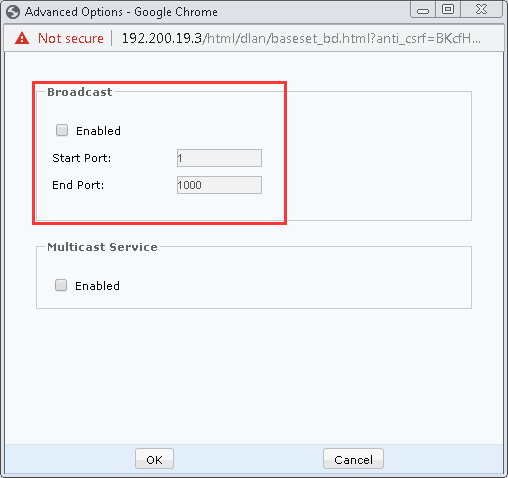
- After enable broadcast settings, broadcast traffic able to transmit without issue.
Root Cause
Both sides did not enable broadcast settings.
Solution
Enable broadcast settings on both devices
Suggestion
- By enabling broadcast setting, the DLAN service will be restarted. Suggest to perform this operation during non-production hours.
- Confirm on the port required to transmit broadcast signal.