
【aCMP】 Manually Remove aOC licensing expired notification
Issue Description
For version before aCMP6.0.10R1, if the customer did not purchase the aOC licensing, the web UI will keep prompt aOC licensing expired warning, which will affect customer’s experience with the aCMP. This issue have been resolved at aCMP6.0.10R1 version.
Handling Process
If the customer is using aCMP with version before aCMP6.0.10R1 and wish to solve this issue, it can be solved by upgrading to at least version aCMP6.0.10R1 or solve by back end modification to manually remove the warning by following the steps as shown below.
-
Modify the following file:
vim /usr/lib/python2.7/site-packages/portal_api/app/serial/provider.py -
Go to the function def get_status_summary, at "aoc_status[‘near_expired’] = \" ,
-
In between of "acmp_auth.is_dev_near_expired(Helper.MODULE_aOC)" and "acloud = dict()", add the following line of code "aoc_status[‘activated’] = True"
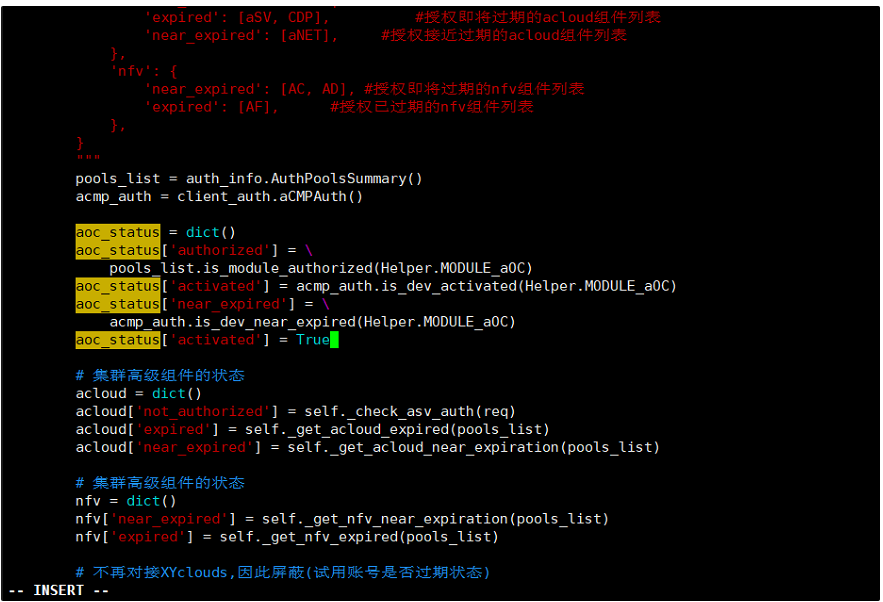
-
Confirm the aCMP have no task running, then restart the portal-api service by using this command " systemctl restart portal-api.service"
-
After rebooting the service, refresh the aCMP web UI and the aOC licensing expired error will be gone.
Solution
Upgrade to version aCMP6.0.10R1 and above able to resolve the issue or perform back end modification to remove the warning manually.